Use this template
HR runs dozens of procedures across an employee's working life: hiring, onboarding, pay changes, transfers, leave, performance reviews, discipline and leaving. When each one is written differently, or not written at all, employees in the same situation get treated differently, managers improvise and the record HR needs in a dispute isn't there. A hire to retire SOP template gives HR one consistent structure for every people procedure, organised around the employee lifecycle.
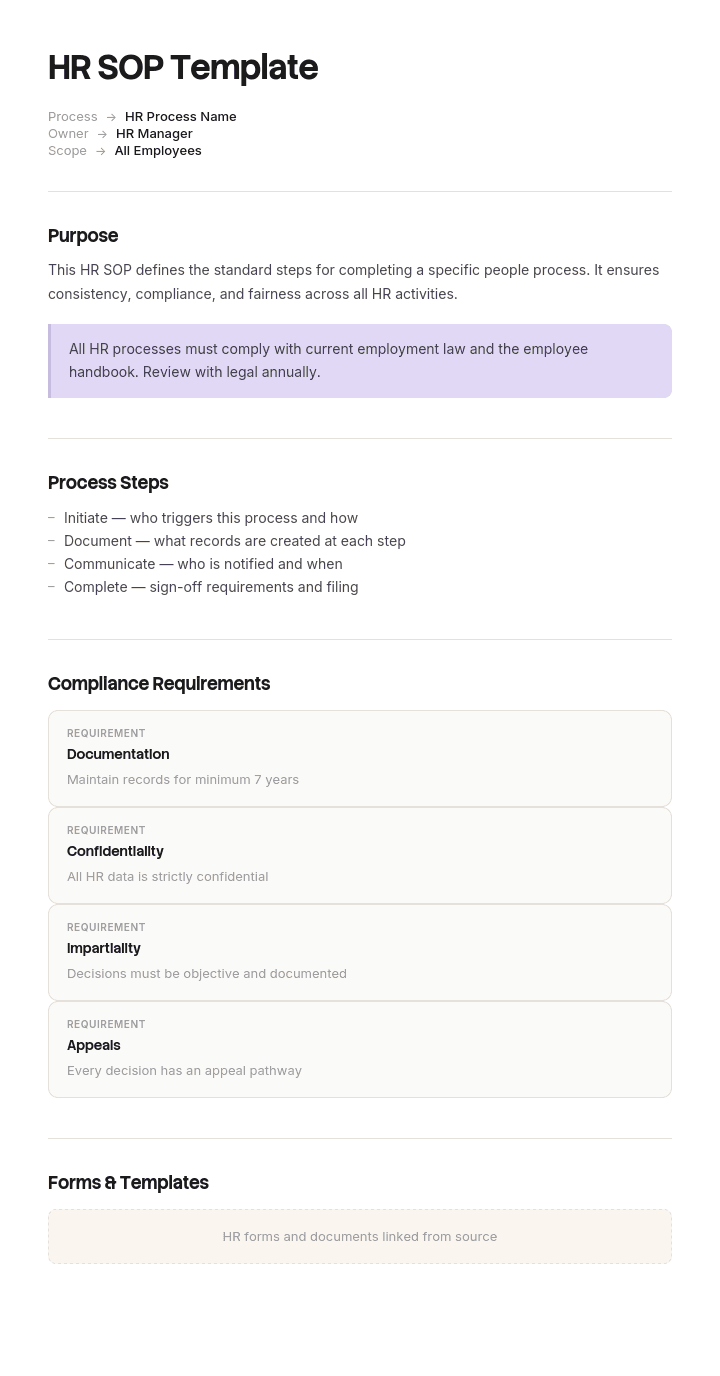
This free hire to retire SOP template is an HR SOP pack: a master SOP structure, a register of every H2R procedure grouped by lifecycle stage and graded by risk, a worked example, an exception-handling table and the controls HR and auditors expect. It works as a single HR SOP template for one procedure or as a complete pack for every stage. Copy the structure below, use the register to plan your set, or open it in Trupeer and customize it for your organisation.
What is a hire to retire SOP template?
A hire to retire SOP template is a set of standard operating procedures covering the full employee lifecycle, from the moment a role is approved to the day an employee leaves or retires. It gives every HR procedure the same structure, including who does what, the timescales, the employee's rights, the records to keep and how personal data is handled, so people processes are consistent, fair and auditable.
It's broader than a single HR SOP template: instead of one procedure, it's the pack your HR team needs for every stage of hire to retire (H2R). For the stage-by-stage process itself, see the hire to retire process flow.
Why does HR need a hire to retire SOP pack?
Consistency is a legal issue in HR. Employees in comparable situations need comparable treatment, and differences need a recorded reason.
The record matters as much as the outcome. In a grievance or tribunal, what was documented at the time carries the weight.
HR procedures handle sensitive data. Personal and health information needs defined access, storage and retention.
Managers carry out many HR steps. They need clear, short procedures they can follow without HR in the room.
HR operating models are changing. Shared services, self-service and new HCM systems all depend on documented procedures.
HR teams change too. Written procedures keep knowledge when experienced HR people move on.
Who uses a hire to retire SOP template?
HR operations and HR shared services teams who run people processes every day.
HR business partners and HR managers who handle complex cases.
People managers who carry out hiring, probation, performance and absence steps.
Talent acquisition teams who run recruitment and offers.
Payroll and benefits teams who process changes and payments.
HRIS and HR transformation teams implementing Workday, SAP SuccessFactors or other HCM systems.
Employment lawyers, auditors and compliance teams reviewing procedures.
Preview the hire to retire SOP template
The template opens with a master HR SOP structure: the fields every people procedure needs, including two that generic SOP templates leave out, employee rights and documentation required. A register lists every H2R procedure, grouped by lifecycle stage and graded by risk tier. A worked example shows a complete tier 1 procedure. An exception-handling table, controls, KPIs and a review cycle complete the pack. Every section is editable, so you can add procedures, change tiers or adapt the fields to your jurisdictions.
How to customize this template in Trupeer
Step 1: Open the Templates Section
Go to the Templates section from the main navigation.

Step 2: Select and Open a Template
Click on any template you want to work with to open it.
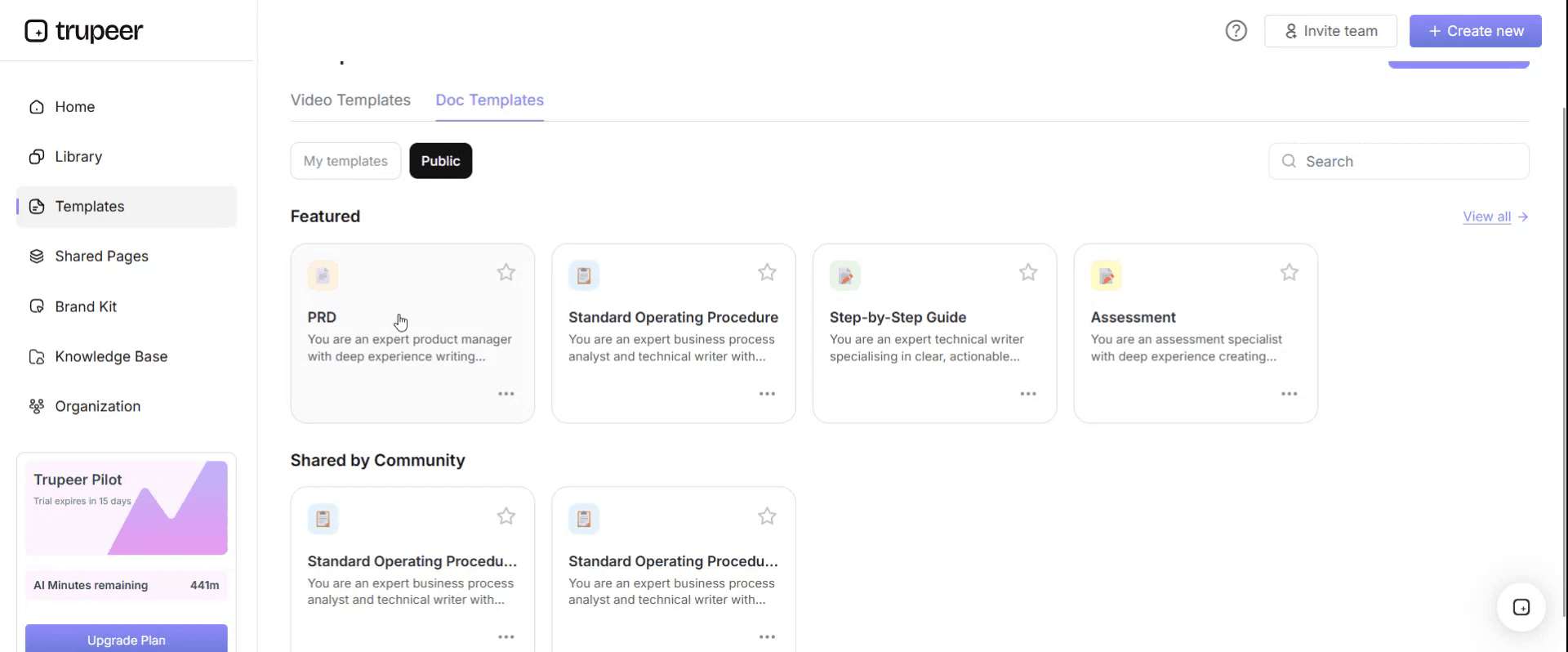
Step 3: Expand the Template View
If needed, expand the template view to see the full layout and details clearly.

Step 4: Edit the Template
Click on Edit to start modifying the selected template.

Within the editor, you can:
Add new sections
Define or update formatting rules
Add a logo and adjust its position and related settings
Step 5: Save Your Customized Template
After making all necessary changes, click Save to store the updated template as your own.
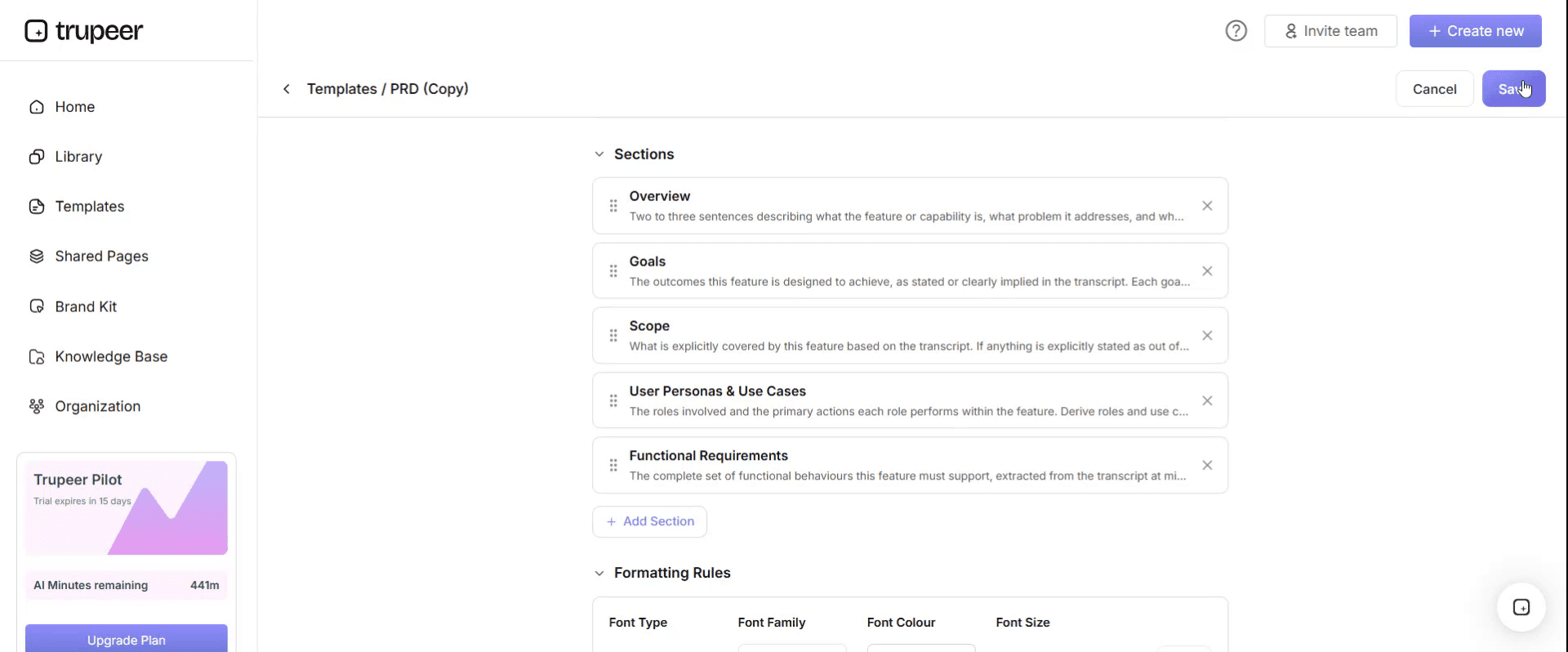
Step 6: Preview and Fine-Tune the Template
When you want to see how your customized template looks, open the Preview.

From the preview screen, you can continue to make adjustments directly if needed, ensuring the template appears exactly as you want.
With a hire to retire SOP template you can:
Document every people procedure the same way: One structure for every stage of hire to retire.
Prioritise by risk: Write the legally consequential procedures first.
Treat employees consistently: Clear steps, timescales and recorded reasons for any variation.
Protect personal data: Build access, storage and retention rules into each procedure.
Train HR teams and managers: Pair each SOP with a short video walkthrough in your HCM.
The hire to retire stages your SOP pack must cover
Stage | Typical procedures |
|---|---|
1. Plan and requisition | Headcount planning, job requisition and approval |
2. Recruit and select | Job posting, screening, interviewing, scoring, candidate communication |
3. Offer and pre-hire | Offer approval, contract issue, background and reference checks, right to work |
4. Onboard | New starter setup, first-day logistics, probation reviews |
5. Manage employee data and changes | Personal data changes, transfers, promotions, contract variations |
6. Pay, benefits and time | Payroll changes, compensation reviews, benefits, leave and absence |
7. Perform and develop | Performance reviews, improvement plans, training and development |
8. Employee relations | Grievance, disciplinary, investigations, flexible working requests |
9. Separate and retire | Resignation, dismissal, redundancy, retirement, offboarding, final pay |
The three risk tiers of HR SOPs
Grade every procedure before writing it, because the tier decides how much rigour it needs.
Tier | Characteristic | Requirement | Examples |
|---|---|---|---|
1. Legally consequential | Inconsistency creates legal exposure | Precise steps, documented at every stage, legal review, no discretion without a recorded reason | Disciplinary, grievance, dismissal, redundancy, discrimination complaints, right to work, accommodation requests |
2. Data-sensitive | Handles personal or special category data | Access controls, retention periods and disclosure rules stated in the procedure | Payroll, employee data changes, medical information, references, background checks |
3. Operational | Efficiency and a consistent experience | Clear steps, sensible owners, lighter documentation | Leave requests, onboarding logistics, training administration |
Most HR teams document tier 3 first, because those procedures are frequent. Tier 1 often gets written only after something has gone wrong. Write at least one tier 1 procedure before any tier 3 one.
Free hire to retire SOP template: the structure to copy
Use this structure for every procedure in your H2R pack. Copy it into your own document, or open it in Trupeer and customize it.
Field | What to enter |
|---|---|
SOP title and reference | For example, Grievance procedure, HR-014 |
H2R stage and tier | Lifecycle stage and risk tier 1, 2 or 3 |
Version and effective date | Current version and the date it applies from |
Owner | A role, not a person |
Approved by | Name, role and date; legal review date for tier 1 |
Applies to | Which employees, locations and contract types |
Purpose | One sentence |
Trigger | The event that starts the procedure |
Roles | Who does what at each step, including managers, HR and payroll |
Timescales | Per step, and whether they're commitments or targets |
Steps | Numbered, with what's recorded at each step |
Employee rights | Where applicable, stated explicitly |
Documentation required | What must be written down and retained |
Data handling | What's collected, who sees it, where it's stored, how long it's kept |
System steps | Where the step happens in your HCM, with a link to the video walkthrough |
Exceptions and escalation | What to do when the standard path doesn't apply, and who decides |
Appeal | Who hears appeals, and by when |
Related documents | Policies, forms and letters |
Review cycle | Frequency and last reviewed date |
Two fields are specific to HR and missing from most generic SOP templates: employee rights and documentation required. Both exist because in HR, the record of having followed the procedure is often as important as the outcome.
The hire to retire SOP register
Build the register first, then write procedures in tier order. Adjust the procedures and tiers to your organisation and jurisdictions.
H2R stage | Procedure | Tier |
|---|---|---|
Plan and requisition | Job requisition and approval | 3 |
Recruit and select | Application screening and shortlisting | 1 |
Recruit and select | Interviewing and scoring | 1 |
Recruit and select | Candidate rejection and feedback | 2 |
Offer and pre-hire | Offer, negotiation and approval | 3 |
Offer and pre-hire | Background and reference checks | 2 |
Offer and pre-hire | Right to work verification | 1 |
Onboard | New starter onboarding | 3 |
Onboard | Probation review | 1 |
Data and changes | Employee data changes | 2 |
Data and changes | Internal transfer and promotion | 2 |
Data and changes | Contract variation | 2 |
Pay, benefits and time | Payroll changes | 2 |
Pay, benefits and time | Leave requests and approval | 3 |
Pay, benefits and time | Absence and return to work | 1 |
Perform and develop | Performance review cycle | 2 |
Perform and develop | Performance improvement plans | 1 |
Employee relations | Grievance | 1 |
Employee relations | Disciplinary | 1 |
Employee relations | Flexible working requests | 1 |
Separate and retire | Resignation and offboarding | 3 |
Separate and retire | Dismissal and redundancy | 1 |
Separate and retire | Retirement | 2 |
Separate and retire | Final pay and leaver data | 2 |
Hire to retire SOP example: a complete tier 1 procedure
Here's how one procedure in the pack looks when complete. The example is illustrative.
HR-014 · Grievance procedure · Employee relations · Tier 1 · v2.1
Purpose. Provide a consistent, documented route for employees to raise concerns about their employment and have them resolved fairly.
Applies to. All employees. Contractors raise concerns through their agency unless the concern relates to conduct on company premises.
Owner. HR Manager. Approved by. HR Director, [date]. Legal review. [date].
Trigger. An employee raises a concern in writing, or verbally in a way that shows they want it treated formally. Employees don't have to use the word "grievance". Any manager receiving a concern that appears formal refers it to HR within one working day.
Steps.
Acknowledge. HR acknowledges in writing within [2] working days, confirming the process, the expected timescale and the right to be accompanied.
Assign. HR assigns a hearing manager with no involvement in the matter, recording the reason for the choice.
Check for escalation. If the concern involves discrimination, harassment, safety or whistleblowing, HR escalates to the HR Director within [1] working day.
Investigate. Where facts are disputed, a separate investigator completes the investigation within [10] working days unless extended in writing with a reason.
Invite to hearing. In writing, at least [5] working days ahead, with the concern as understood, any evidence and the right to be accompanied.
Hold the hearing. A separate notetaker records it. If new information emerges, adjourn rather than decide on the spot.
Decide. The outcome, reasoning, any action and the right of appeal are confirmed in writing within [5] working days.
Appeal. Heard by someone more senior with no prior involvement, with the outcome in writing within [10] working days.
Employee rights. To raise a concern without detriment, to be accompanied, to see evidence relied on, to appeal, and protection from retaliation whether or not the grievance is upheld.
Records and data. All correspondence, notes and outcomes are kept on a case file separate from the personnel file, for [retention period], with access limited to HR and those directly involved.
Never. Have the grievance heard by its subject, discuss it with anyone not involved, or delay without written notice to the employee.
Grievance procedures are governed by employment law and, in some jurisdictions, by statutory codes of practice. Have yours drafted or reviewed by a qualified employment adviser.
Exceptions in hire to retire procedures
Exception | How to recognise it | Action | Decision owner | Escalate to |
|---|---|---|---|---|
Timescale can't be met | A committed deadline will be missed | Tell the employee in writing before the deadline, with a reason and new date | HR case owner | HR Manager |
Conflict of interest | The assigned manager is involved in the matter | Reassign and record why | HR Manager | HR Director |
Right to work check incomplete | Documents missing or can't be verified before start date | Delay the start date; do not let the person start work | Talent acquisition | HR Director |
Retroactive pay change | Change effective before the current payroll period | Calculate arrears; get approval before the payroll cut-off | Payroll | HR operations lead |
Sensitive data requested | Manager or third party asks for health or case details | Share only what's needed to act, per the data handling section | HR business partner | Data protection lead |
Case outside the procedure | Situation doesn't fit any procedure | Stop and seek HR leadership or legal advice before acting | HR Manager | HR Director |
Controls to build into your hire to retire SOPs
Control | Why it matters |
|---|---|
Legal review of tier 1 procedures | Keeps procedures in line with employment law |
Recorded reasons for any variation | Makes differences in treatment explicable |
Independent hearing and appeal managers | Ensures fairness and avoids conflicts of interest |
Restricted access to case and health data | Protects personal and special category data |
Approval of pay and contract changes | Prevents unauthorised changes |
Right to work checks before start | Meets legal obligations |
Regular review of procedures against practice | Keeps written procedures and real practice aligned |
Hire to retire SOP KPIs
Time to hire: from approved requisition to accepted offer.
Onboarding completion: new starters with all setup done by day one.
HR case timescales met: share of tier 1 cases meeting committed timescales.
Payroll accuracy: pay changes processed correctly first time.
HR self-service adoption: transactions completed by employees and managers without HR.
Procedures reviewed on time: share of SOPs reviewed by their due date.
Set your own targets and baseline them before you change the process.
How to build your hire to retire SOP pack from recordings
Build the register and tier every procedure.
Start with tier 1 procedures, drafting them with HR leadership and legal input.
Record HR specialists and managers doing the system steps in your HCM, narrating each check and decision.
Generate step-by-step guides and videos with Trupeer and link them from the System steps field of each SOP.
Get approval at the right level for each tier.
Publish in one searchable place for HR, managers and employees, and update procedures when law, policy or systems change.
For the broader documentation picture, see the HR transformation documentation playbook.
Best practices for hire to retire SOPs
Follow what you write. A procedure that promises more than you deliver creates a standard you breach.
Document decisions, not just outcomes, recorded at the time.
Write for managers as well as HR, with short procedures for the steps they carry out.
Keep employee-facing guidance simple, with self-service guides for common tasks; see HR self-service training.
Review tier 1 procedures whenever employment law changes in a jurisdiction where you employ people.
Common mistakes to avoid
Writing tier 3 procedures first and leaving the risky ones until something goes wrong.
Promising timescales the team can't meet.
No employee rights or documentation sections, so the record doesn't support the outcome.
Keeping case and health data in the general personnel file.
One procedure for every country when employment law differs.
How Trupeer helps you build and maintain your hire to retire SOPs
H2R SOP challenge | How Trupeer helps |
|---|---|
HR system steps are known by a few specialists | Record them in your HCM, and Trupeer's SOP creator turns each recording into a step-by-step guide and video |
Managers forget steps they use rarely | Short videos show exactly how to approve a change, run a probation review or start an offboarding |
HR teams and employees work in many languages | Translate SOPs and videos from one source into 65+ languages |
The HCM or policy changes | Update videos by editing the script, and replace a single step instead of re-recording |
Procedures are scattered across folders | Publish every SOP and guide in one searchable knowledge base |
Genpact used this recording-first approach for a company-wide Workday rollout, turning recorded process sessions into more than 500 training collaterals across 20 workstreams in five languages, for 140,000 employees in 40 countries, in 3 months instead of 12. Read the Genpact customer story.
Legal notice
This template and the example above are for general guidance only and don't constitute legal advice. Employment law varies by country and changes over time. Have your hire to retire procedures, especially tier 1 procedures, drafted or reviewed by a qualified employment adviser for each jurisdiction where you employ people.
Download the free hire to retire SOP template
Open the template in Trupeer, apply your brand kit, build your register and add your procedures, and share this HR SOP template pack with HR, managers and employees. Get the free hire to retire SOP template.
Related templates
Payroll SOP template
Frequently Asked Questions
What is a hire to retire SOP template?
It's a set of standard operating procedures covering the full employee lifecycle, from job requisition and hiring to onboarding, changes, pay, performance, employee relations and separation or retirement, all using one consistent structure.
What does hire to retire (H2R) mean?
Hire to retire is the end-to-end HR process that covers an employee's whole working life with an organisation, from recruitment to leaving or retirement.
What should an HR SOP include?
A reference, tier, owner, approval, scope, purpose, trigger, roles, timescales, numbered steps, employee rights, documentation required, data handling, system steps, exceptions, appeal, related documents and a review cycle.
Which HR procedures should be documented first?
Legally consequential, tier 1 procedures such as grievance, disciplinary, dismissal, right to work and absence management, because inconsistency there creates the most risk.
What are the stages of hire to retire?
Plan and requisition, recruit and select, offer and pre-hire, onboard, manage employee data and changes, pay, benefits and time, perform and develop, employee relations, and separate and retire.
How do you handle personal data in HR SOPs?
State in each procedure what data is collected, who can see it, where it's stored, how long it's kept and when it's deleted, with stricter handling for health and case information.
Is there an HR SOP template in Word?
Yes. Word suits HR SOPs because they combine structured fields with narrative steps. Open the template in Trupeer, customize it and export it in the format you need.
Is there a hire to retire SOP template in Excel?
The procedures work best as documents, but the SOP register, with stages, tiers, owners and review dates, works well in Excel.
Is there a hire to retire SOP template PDF?
Yes. Export approved procedures as PDFs for distribution, and keep the editable versions as the masters.
Is the hire to retire SOP template free?
Yes. Sign up free to open the template in Trupeer, customize it and export it.
How often should HR SOPs be reviewed?
At least annually, immediately for tier 1 procedures when employment law changes, and whenever your HCM, policies or operating model change.
Can I create HR SOPs from screen recordings?
Yes. Record HR specialists and managers doing the system steps in your HCM, and Trupeer turns the recordings into step-by-step guides and videos you can link from each SOP.


