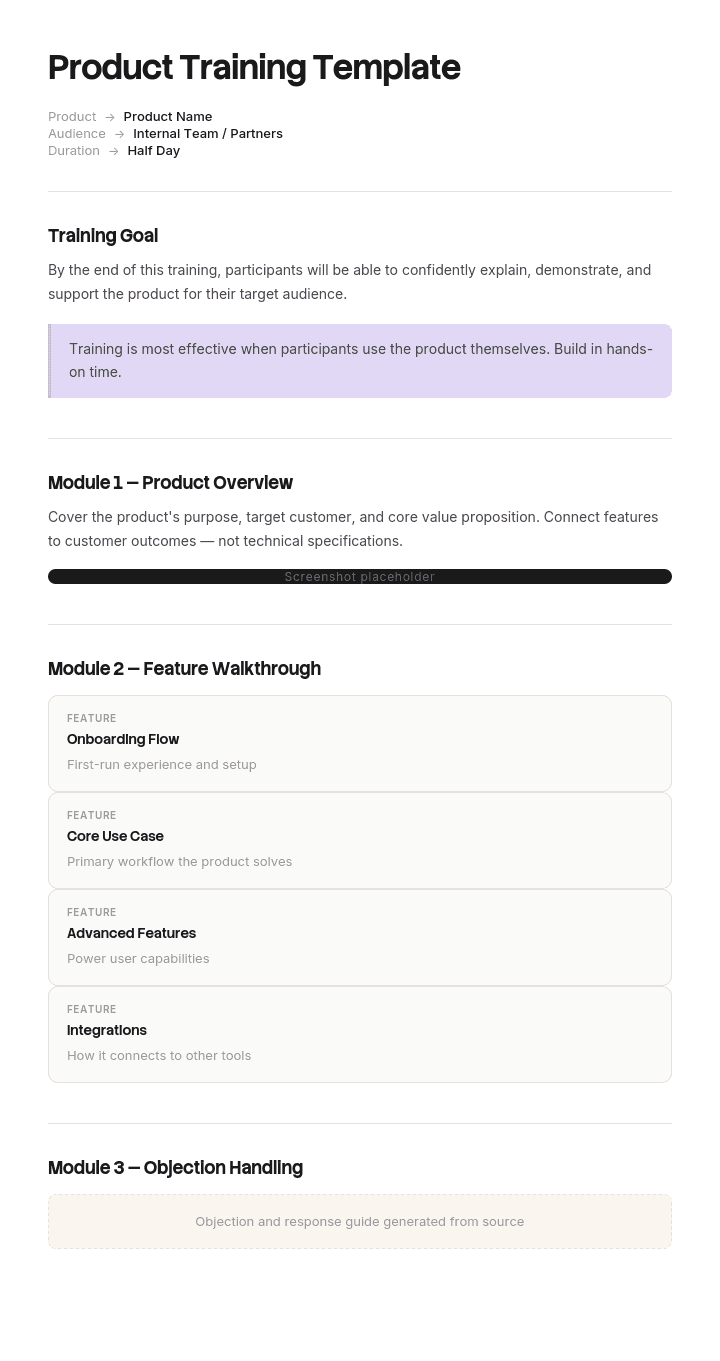
Use this template
Great product training is what turns curious users into confident customers and new hires into productive team members. With Trupeer, you can save hours on training design by starting with a free product training template, customizing it with your brand guidelines, and turning the training into engaging video modules.
What is a product training template for?
A product training template is the reusable structure for the material you put in front of people learning your product: the modules, what each covers, how long it runs, what the learner does, and how you know it worked.
It sits alongside the plan rather than replacing it. The plan decides who is trained, in what order and on what schedule, and our product training plan template covers that, including the release problem specific to product training. This page covers the material itself.
Most templates for it offer a module outline, a duration and a slot for objectives. That is a container rather than a design, and the design decision that determines whether the training works is made before any of those fields get filled in.
It is the decision about what the modules are.
If your modules match your nav menu, rebuild
Here is a test that takes two minutes.
Write down your training module list. Write down your product's main navigation. Put them side by side.
In most product training they are the same list. Nine modules for nine areas of the product, in the order the product presents them.
That happens for an understandable reason. The people who build product training know the product, and the product's structure is the most available organising principle. It also feels complete: every area covered, nothing missed.
But nobody arrives at your product wanting to learn an area of it. They arrive wanting to do something, and the thing they want to do almost never sits inside one area. Onboarding a new employee, processing a return, closing a period, setting up a new client: each of these crosses several parts of the product, and each is taught in fragments across several modules, none of which shows the whole thing.
The learner then has to assemble the actual task from pieces delivered in a different order, on different days, by an instructor who never demonstrated it end to end. Most people cannot, so they ask support instead.
Training organised by feature teaches your product's structure. Training organised by task teaches somebody to use it.
How to customize this template in Trupeer
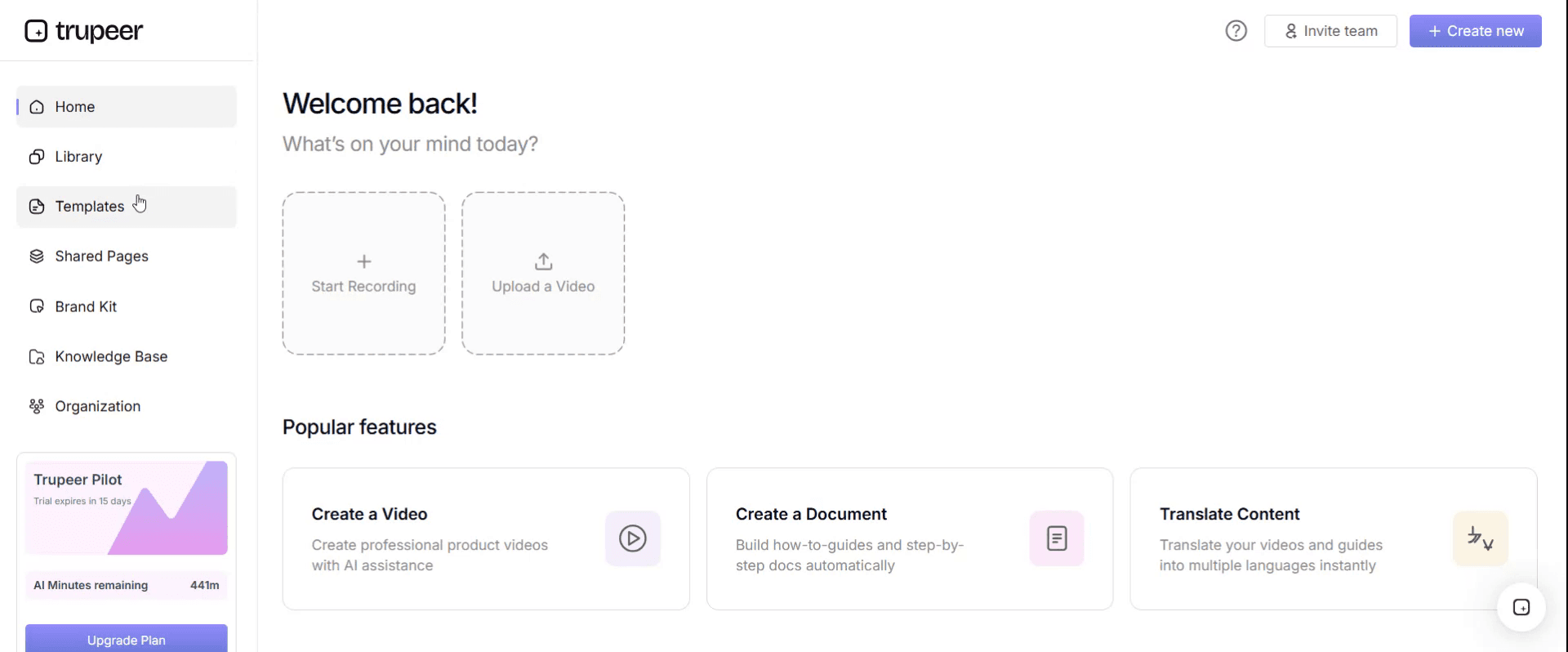
Step 1: Open the Templates Section
Go to the Templates section from the main navigation.
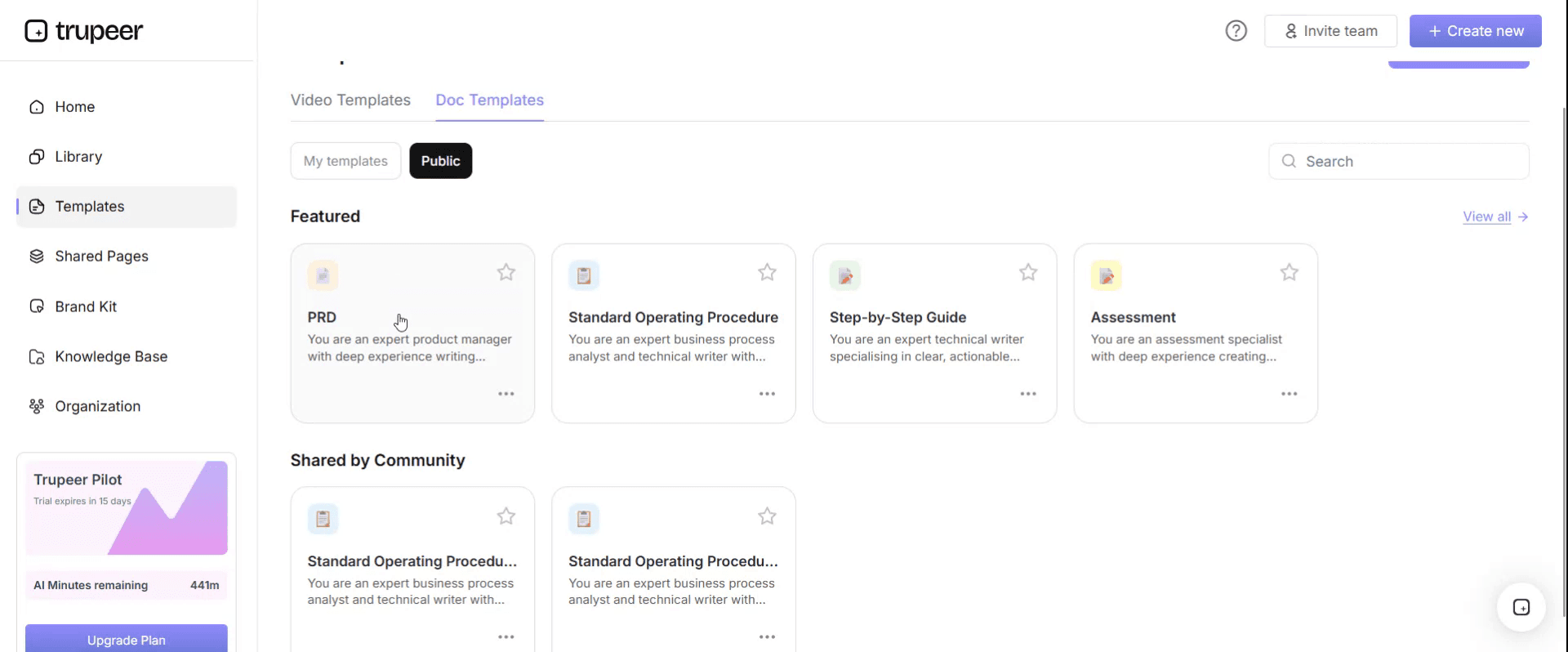
Step 2: Select and Open a Template
Click on any template you want to work with to open it.
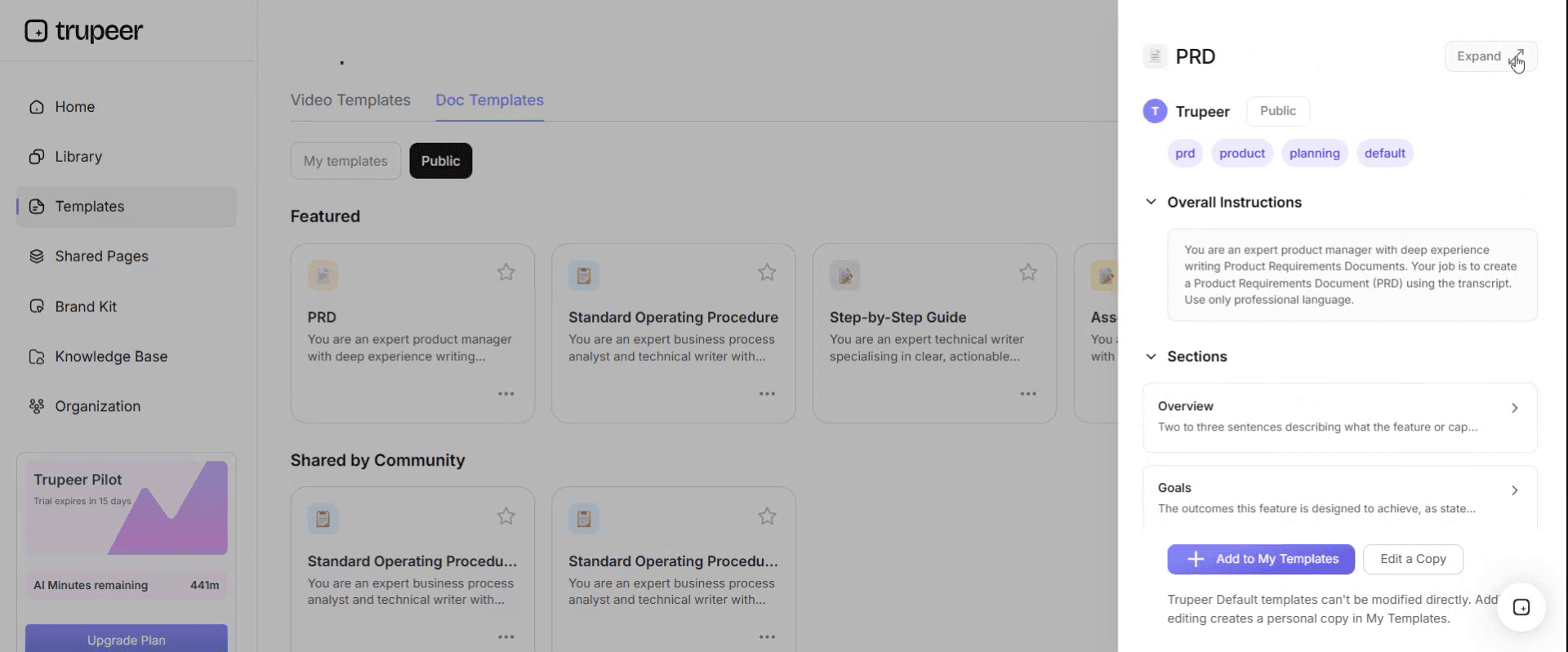
Step 3: Expand the Template View
If needed, expand the template view to see the full layout and details clearly.
Step 4: Edit the Template
Click on Edit to start modifying the selected template.
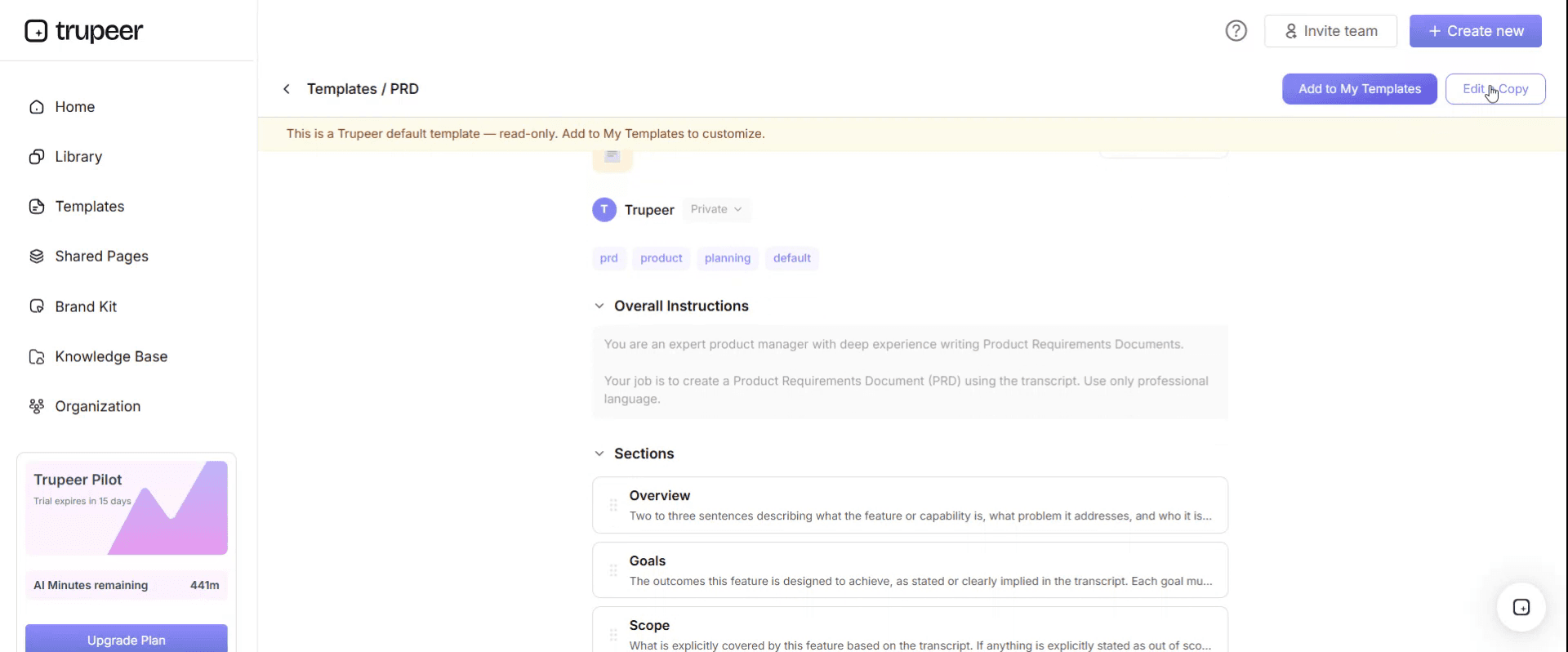
Within the editor, you can:
Add new sections
Define or update formatting rules
Add a logo and adjust its position and related settings
Step 5: Save Your Customized Template
After making all necessary changes, click Save to store the updated template as your own.
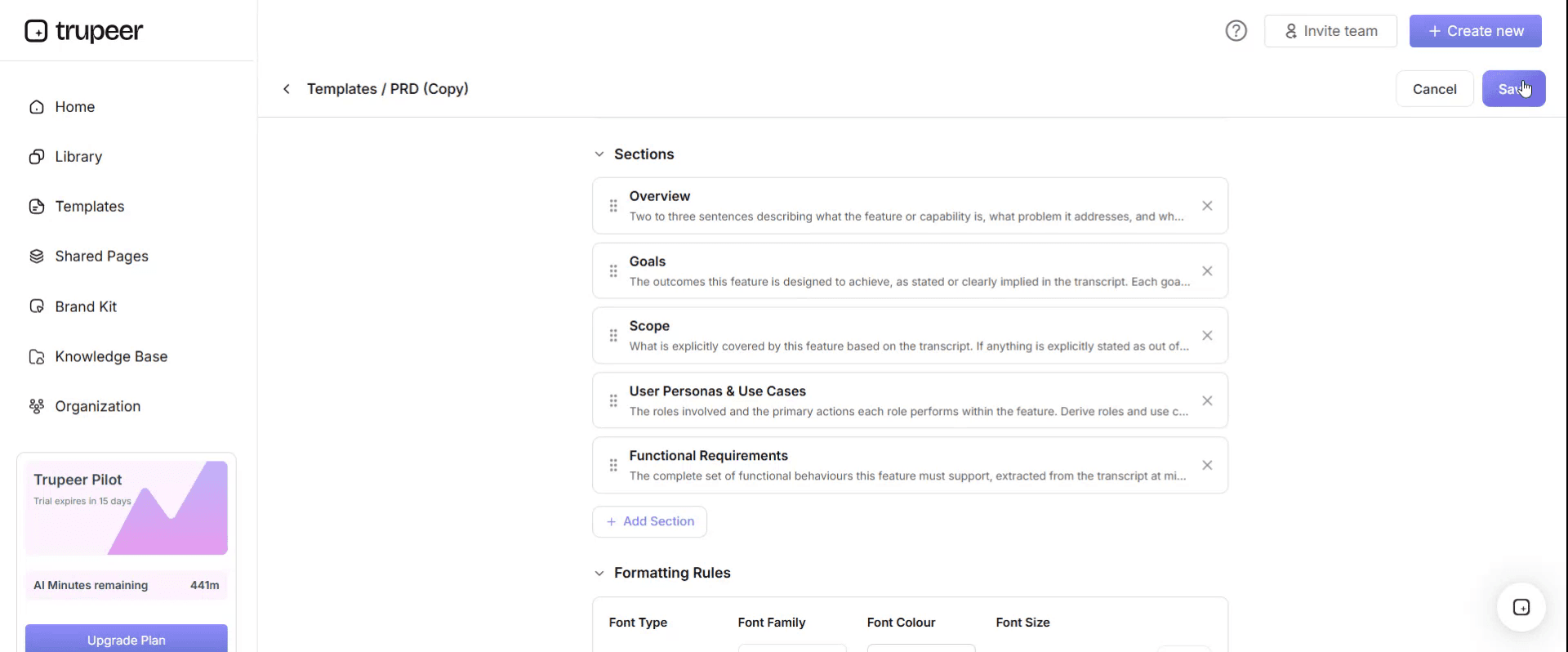
Step 6: Preview and Fine-Tune the Template
When you want to see how your customized template looks, open the Preview.
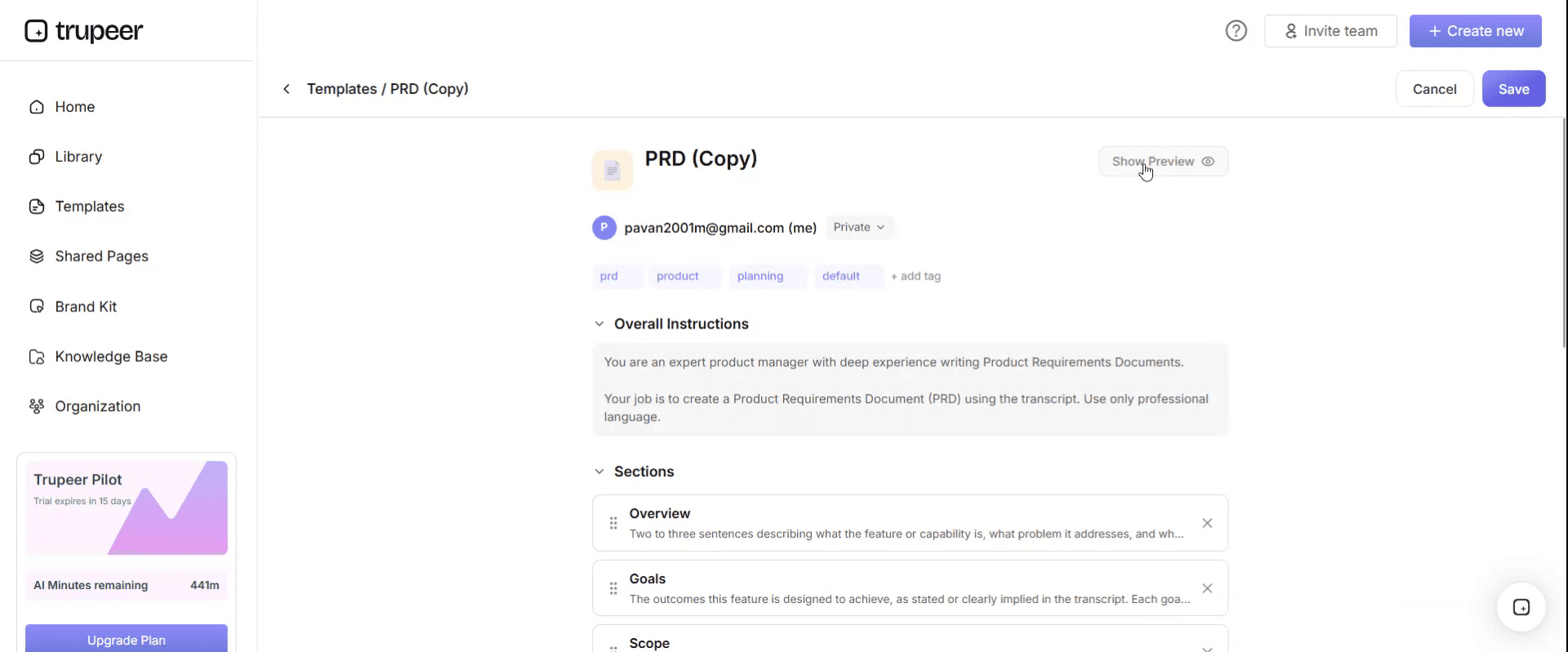
From the preview screen, you can continue to make adjustments directly if needed, ensuring the template appears exactly as you want.
With a product training template you can:
Save hours on design: Skip the blank page with a proven training structure.
Train multiple audiences: Adapt the same template for new hires, customers and partners.
Stay on-brand: Apply your logo, fonts and colors using Trupeer's brand kit.
Engage learners: Convert text-heavy content into video training that's easier to consume and retain.
Scale globally: Translate product training into 65+ languages with one click.
Measure impact: Built-in metrics fields help you track engagement and completion.
How to build the task list your training should follow
The task list is the design, and it should come from evidence rather than from a workshop.
Product analytics. The twenty most common sequences new users actually perform in their first thirty or sixty days. If you cannot get sequences, the twenty most used features in that window is a reasonable proxy.
Support contacts. What newly trained users contact you about. Each of those is either a task that was not taught or one that was taught badly, and our product support SOP template covers mining that data properly.
Implementation and onboarding notes. What consultants or customer success actually walk people through, which is frequently a different list from the official course.
Sales calls. What prospects ask "but can it..." about, which tells you what people expect the product to do for them.
Merge those into a list of tasks phrased as outcomes, then mark which product areas each one touches. Two things fall out immediately. The tasks that cross the most areas are the ones your current training fragments worst. And the product areas that appear in none of the top tasks are the ones consuming training time for no return.
Cut to eight or ten tasks for a first course. Everything else goes into an on-demand library.
The watching to doing ratio nobody measures
The second design variable is what proportion of the training is watching and what proportion is doing.
Nobody has been trained on software by watching someone else use it. Retention comes from performing the task, getting it wrong, and correcting. That is not a controversial claim and almost every product course is still eighty five percent demonstration.
Measure the ratio deliberately. Count the minutes of demonstration and the minutes where the learner is in a sandbox doing something, and write both numbers on the plan.
A workable target for internal audiences is roughly half and half. For customer training, slightly more demonstration is defensible because attention is voluntary and shorter, but under seventy percent watching should still be the aim.
Three things make the doing half work. A sandbox with realistic data, since an empty environment teaches nothing about the actual task. A task with a checkable end state, so the learner knows whether they did it. And permission to get it wrong, which means the sandbox must be genuinely disposable.
Where a task is too consequential to practise, that is a signal it needs a job aid at the point of work rather than a training module.
Free product training template: the structure to copy
Copy from here. One entry per task-based module.
Course header. Product and version. Audience. Total duration. Watching to doing ratio. Owner. Last reviewed date.
Task modules. For each:
The task, phrased as the outcome the learner wants. "Onboard a new employee from offer to first payroll" rather than "the People module".
Product areas touched. Which parts of the product this task crosses. Useful for spotting fragmentation and for knowing what a release affects.
Why it matters, in one line: how often this happens and what goes wrong when it is done badly.
Demonstration, with its duration.
Practice task, with realistic starting data and a checkable end state.
Common mistakes, meaning the two or three things learners get wrong, which come from your support data rather than from imagination.
Where to look it up afterwards. The link to the article or guide covering this task, since training is not the delivery mechanism for reference material.
On demand library. Everything that did not make the top ten, available but not scheduled.
Assessment. What the learner does unsupervised to demonstrate the capability, and who observes it.
Copy to here. Two pages for the plan, with the modules themselves held separately.
The HR software course where one task crossed five modules
Alderway HR sells human resources software to mid-sized employers. Its customer training course for new administrators had nine modules mirroring the product's nine navigation areas: dashboard, people, time and attendance, payroll, recruitment, performance, reporting, settings and integrations.
Four and a half hours, delivered live and available as recordings. Completion sat at seventy one percent and satisfaction at four out of five.
The numbers that did not fit were downstream. Thirty day feature adoption for new accounts was flat year on year, and newly trained administrators generated an average of eight point four support contacts per account in their first sixty days.
Somebody pulled the twenty things new administrators actually did most often in their first sixty days, from product analytics and support tickets, and laid them against the module list.
The single most common task, onboarding a new employee end to end, touched five of the nine modules. It was taught in five separate fragments across five sessions, and at no point did anybody demonstrate the whole flow.
Of the twenty top tasks, fourteen crossed two or more modules. Six sat inside one.
Meanwhile three modules, covering integrations, performance and recruitment, addressed features that fewer than fifteen percent of new accounts touched at all in their first sixty days. That was around ninety minutes of a four and a half hour course spent on things almost nobody needed yet.
The rebuild replaced nine feature modules with eight task modules. Onboard a new employee. Run your first payroll. Correct a timesheet error. Add a manager and set their permissions. Produce the monthly headcount report. Each one end to end, crossing whatever parts of the product it crossed.
Total duration fell from four and a half hours to two point six, partly because the redundancy between feature modules disappeared and partly because the low-usage features moved into an on-demand library.
The watching to doing ratio went from roughly eighty five fifteen to forty five fifty five, with a sandbox task after each module.
Six months later, completion was eighty eight percent, helped considerably by the course being shorter. Thirty day feature adoption was up twenty two percent. Support contacts from newly trained administrators in their first sixty days had fallen from eight point four to four point nine per account.
The product had not changed. Only the shape of the course had.
Product training manual or training plan: which do you need?
Three documents get confused here and they have different jobs.
The training plan decides who gets trained on what, in what order, on what schedule, and how it stays current as the product ships. Our product training plan template covers it.
The training material, which this page covers, is what learners actually experience: the modules, demonstrations and practice tasks.
The training manual is the reference document a learner keeps afterwards. It is not a transcript of the course and it should not be, because reference material is scanned rather than read. Our manual templates page covers how many separate manuals you actually need, and our customer service training manual template is a worked example for one function.
The common failure is producing one artefact and asking it to be all three. A manual read aloud is a bad course, and a course transcribed is a bad manual, because a person mid-task wants a page and a person learning wants a sequence.
Build the material as tasks, and let the manual be the place each task is written down for looking up later.
How to create a product training template in five steps
One. Build the task list from evidence, using analytics, support contacts and implementation notes rather than a workshop with the product team.
Two. Cut to eight or ten tasks, ranked by frequency in the first sixty days. Everything else goes on demand.
Three. Design each module end to end, crossing whatever product areas the task crosses, with the demonstration and the practice task written together rather than the practice added afterwards.
Four. Set the ratio. Decide the watching to doing split before building anything, because it is impossible to retrofit.
Five. Write the common mistakes from support data, then test the module on somebody who has never used the product and watch where they stall.
The step people skip is the first one, and skipping it is what produces a module list that matches the navigation menu.
Same product, three depths: sales, support and implementation
One more decision separates good product training from generic product training: internal audiences need the same tasks at genuinely different depths.
Sales needs to perform the task convincingly in a demonstration, understand what it is worth to the buyer, and know where the product stops. They do not need configuration.
Support needs to know how the task fails, what the error states look like, and what the workarounds are. They need the unhappy path more than the happy one.
Implementation needs configuration, edge cases and how the task behaves with unusual data or at volume.
Build the task modules once and layer the depths, rather than building three courses. The demonstration is shared. The practice task differs: sales practises presenting it, support practises breaking and diagnosing it, implementation practises configuring it.
Customers get a fourth version, shorter still, organised entirely around their outcomes rather than yours. Our new hire training template covers the wider sequencing question for internal joiners.
Product training template examples worth copying
Task walkthrough. One task, end to end, demonstration then practice, ten to fifteen minutes. The default unit and the one most courses lack.
Sandbox scenario. A realistic situation with dirty data and a checkable end state. Considerably more effective than a clean walkthrough and slightly harder to build.
Failure gallery. For support audiences: what each common fault looks like from the user's side, with the diagnostic path. Rare, and the single most valuable asset a support team can be given.
Demonstration script. For sales: the exact sequence, the things to say, and the questions to expect. Prevents the drift where six salespeople demonstrate six different products.
Comparison module. Where competitive positioning matters, one module covering how the task is done in the alternative and why yours differs. Durable, so worth building well.
On demand library. Everything outside the top ten tasks, findable rather than scheduled, sitting in your knowledge base alongside the customer-facing articles.
Why most training templates fail in practice
They are containers, not designs. A module outline with objectives and durations does not tell you what the modules should be, which is the only decision that matters.
They mirror the product. Covered at length above, and it is the most common failure by a wide margin.
They assume watching works. Duration is planned, practice is not, and practice is what produces capability.
They cover everything. Comprehensiveness is the enemy here, because time spent on features nobody uses yet is time taken from the tasks everyone does immediately.
They are built once. Product training decays on the release schedule, which our product training plan template addresses directly.
They are expensive to change. Which is why the previous point never gets fixed, and it is the constraint the last section on this page is about.
Can I get a training template in Word, PDF or Canva?
Word or Google Docs for the course design document: the task list, the module structure, the practice tasks and the assessment. This is what gets agreed with the people whose teams are being trained.
Excel for the module register, with one row per module showing the task, the product areas touched, duration, watching and doing split, owner and last rebuilt date.
Canva or slides for learner-facing material where visual quality matters, particularly customer training, and it is a reasonable choice for a training manual that will be read as a PDF.
PDF for the manual and for anything issued to customers or partners, exported from the source rather than maintained separately.
The format that matters most is not on this list. For the demonstration and practice modules themselves, video and interactive walkthroughs beat every document format, and the reason most product training is document-shaped is production cost rather than effectiveness.
How to build the material without a production project
Everything on this page assumes you can rebuild a module when the product changes. If a module means a script, a studio and an agency, you will build the course once, discover it is feature-shaped, and be unable to fix it.
Trupeer AI removes that constraint. Somebody performs the task in the product with a recording running, and the output is a written guide and a video from the same pass, with the steps and screens already captured. A task module becomes an afternoon rather than a production budget.
Record it. Brand it. Translate it. Trupeer it.
That changes what is possible in the design. Task-based modules become affordable even though they cross product areas and therefore take longer to demonstrate. Depth variants for sales, support and implementation become viable because the demonstration is recorded once. And translation stops being a separate project, which is usually where multi-region product training quietly stops.
Training videos and guides cover delivery, brand kits keep customer-facing material looking like your product, and the on-demand library lives in your knowledge base. Setup instructions are in the document template setup guide.
Frequently Asked Questions
Is there a free training manual template in Word?
A manual is a different artefact from the course and needs a different structure, which our manual templates page covers, including how to decide how many separate manuals you need. Word suits it well. Do not build the manual by transcribing the course, since reference material is scanned rather than read in sequence.
Is there a training manual template in PDF?
Export the manual to PDF once it is agreed, and keep the source editable. For product training specifically, expect the manual to need updating on the same release schedule as the course, which is the argument for keeping it short and linking to articles rather than reproducing them.
Is there a training manual template for Canva?
Canva works well for learner-facing manuals where presentation matters, particularly customer training. Take the structure from the manual templates page and lay it out there. For anything long enough to need cross-references and a generated contents page, a document editor handles it better.
Is there a training schedule template in Excel?
Yes, and it is a different document from both the course and the plan. The schedule is dates, cohorts, sessions and attendance. Build the course design first, then generate the schedule from it, because a schedule built first tends to fill the available time rather than the actual need.
Is there a training plan template in Excel?
Excel suits the module register: task, product areas touched, duration, watching and doing split, owner and last rebuilt date. Our product training plan template covers the plan itself, including the version control problem that applies to any product that ships regularly.
Where can I find a training plan sample in PDF?
Published samples are easy to find and worth reading for section order. The more useful exercise is the nav menu test on your existing course, which takes two minutes and tells you more about whether your training works than any sample will.
How long should product training be?
Shorter than most courses are. Two to three hours for a customer administrator course and a day for an internal audience is plenty, provided the time goes on the top tasks and half of it is practice. Long courses correlate with feature-shaped design, because covering everything takes longer than covering what people do.
Who should build product training material?
Somebody who has watched real users struggle, working with somebody who knows the product deeply. Material built only by product experts covers what is interesting about the product. Material built only by trainers covers what is easy to explain. The task list is what keeps both honest, because it comes from evidence rather than from either opinion.


