Trupeer Blog
Shrnout

Did you know that 91% of people want to see more online videos from brands in 2026? That’s right. Video isn’t just a “nice to have” anymore! Instead, it’s how people want to learn about your product or get trained.
Given this huge demand, tools like Synthesia.io made waves by turning text into avatar-led videos without needing a camera or studio. It’s fast and was widely adopted for training, onboarding, and internal communication.
But the real users are complaining! Yes, Synthesia isn’t for everyone. Many users find it:
Too rigid
Having limited Avatars
Highly expensive
As a result, in 2026, more and more creators, marketers, and educators are searching for Synthesia alternatives that offer more control and better customization. Are you in the same boat?
In this guide, we will compare seven strong Synthesia io alternatives - Trupeer AI, HeyGen, VEED, Camtasia, Colossyan, D-ID and Vyond - including options that do not use talking-head avatars at all. Read this article till the end to find the right tool and create high-quality videos that actually leave an impact!
Quick Answer: The Best Synthesia Alternatives in 2026
Trupeer AI - best Synthesia alternative without talking-head avatars: turns real screen recordings into narrated videos and written guides.
HeyGen - best for realistic AI avatars and video translation.
VEED.io - best browser-based editor with AI features.
Camtasia - best for screen recording with full manual editing.
Colossyan - best for interactive training videos with SCORM.
D-ID - best low-cost option for photo-to-avatar talking videos.
Vyond - best for animated, character-led explainers.
Synthesia Pricing and Limits in 2026
Basic – free, with 1,200 credits a month (roughly 10 minutes of video).
Starter – $29/month, or $18/month billed yearly, for 120 minutes of video a year.
Creator – $89/month, or $64/month billed yearly, for 360 minutes a year, with SCORM export.
Enterprise – custom pricing, with 240+ stock avatars and 160+ languages.
Synthesia is rated 4.6/5 on G2 (based on 2,785 reviews). It remains strong for enterprise training and localisation, but minutes are metered tightly: 360 minutes a year on Creator works out to 30 minutes a month. That, plus avatar realism and content restrictions, is why many teams compare alternatives.
How We Picked These Synthesia Alternatives
Format: avatar-led, screen-recording-led, animated, or edited video.
Output quality: realism of avatars and voices, or polish of screen recordings.
Training features: translation, quizzes and SCORM export.
Pricing: free plans, published prices and how minutes or credits are metered.
Ease of use: browser-based, with no editing skills needed.
A note on bias: Trupeer AI is our product and we have listed it first. We note where each tool, including Trupeer, is not the right choice. Pricing was checked on each vendor’s public pricing page in September 2026, so confirm before you buy.
Synthesia Alternatives at a Glance (2026 Pricing)
Tool | Best for | Platform | Free plan | Paid from | AI avatars | SCORM |
|---|---|---|---|---|---|---|
Synthesia (for reference) | Enterprise avatar videos | Web | ~10 min/mo | $18/mo (yearly) | Yes | Creator+ |
Trupeer AI | Screen recordings to video + guide | Web, Chrome | 10 days (1,000 AI credits) | $40/mo (yearly) | Optional | Higher tiers |
HeyGen | Realistic avatars and translation | Web | Yes | $29/mo | Yes | No |
VEED.io | Browser editing with AI | Web | Watermarked | $12/user/mo (yearly) | Yes | No |
Camtasia | Screen recording and editing | Windows, Mac | Trial | $39/yr | No | Yes |
Colossyan | Interactive training | Web | 20 min/mo | $30/member/mo (yearly) | Yes | Yes, 5/mo |
D-ID | Photo-to-avatar videos | Web | 14-day trial | $4.70/mo (yearly) | Yes | No |
Vyond | Animated explainers | Web | Trial | $58/mo (yearly) | Yes | No |
Synthesia Alternatives Without Talking-Head Avatars
Before choosing a tool, ask one question: is the presenter the content, or is the screen the content?
The presenter is the content (company announcements, compliance intros, welcome videos): an avatar tool like Synthesia, HeyGen, Colossyan or D-ID makes sense.
The screen is the content (product walkthroughs, software training, support how-tos): an avatar reading instructions over a static slide is usually weaker than showing the real product. Trupeer AI turns a real screen recording into a narrated, zoomed and branded video with a written guide, with an avatar only if you want one. Camtasia and VEED are manual alternatives.
Many teams use both: an avatar tool for presenter-led messages and a screen-recording tool for product content.
The 7 Best Synthesia Alternatives in 2026
Here are the top Synthesia alternatives compared one by one, starting with tools that do not rely on talking-head avatars.
1. Synthesia vs Trupeer AI: Best Synthesia Alternative Without Talking-Head Avatars
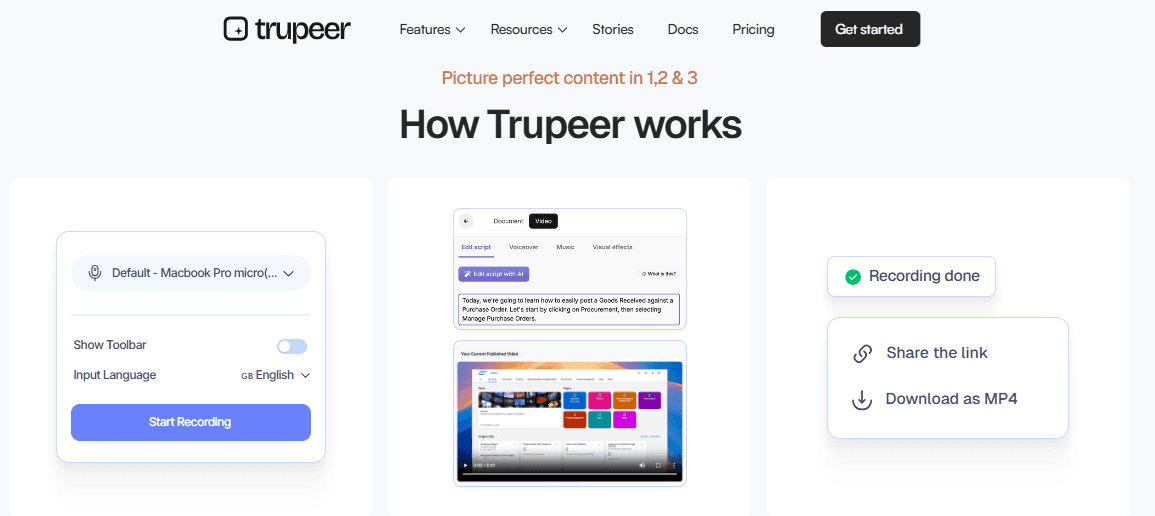
Trupeer is an AI-powered tool that turns screen recordings into professional videos and written guides automatically. It also includes a document to video converter, so existing docs and guides can become narrated videos without recording anything. Using this Synthesia AI alternative, you can create high-quality product videos or how-to guides without needing video editing or writing skills. This free AI video generator is widely used by:
Product marketers
Managers
Support teams
Content creators
Technical writer
Key Features of Trupeer
You start by recording your screen using the Trupeer Chrome extension. Once you finish, the AI takes over and:
1. Generates a complete video from your screen actions and voice.
2. Creates a script by cleaning up your narration and removing unnecessary words.
3. Adds a voiceover using AI voices (100+ languages and accents are available). Custom voice clones are available on the Enterprise plan.
4. Zooms in automatically on important areas and highlights key actions.
5. Adds an avatar to narrate the video if you don’t want to appear on camera.
6. Adds subtitles and captions and can translate them from a library of 100+ languages (on Scale and Enterprise plans).
7. Additionally, you can edit scripts, change voiceovers, and add music or logos. The final video can be downloaded or shared through links or by embedding it on websites.
Pros of using Trupeer
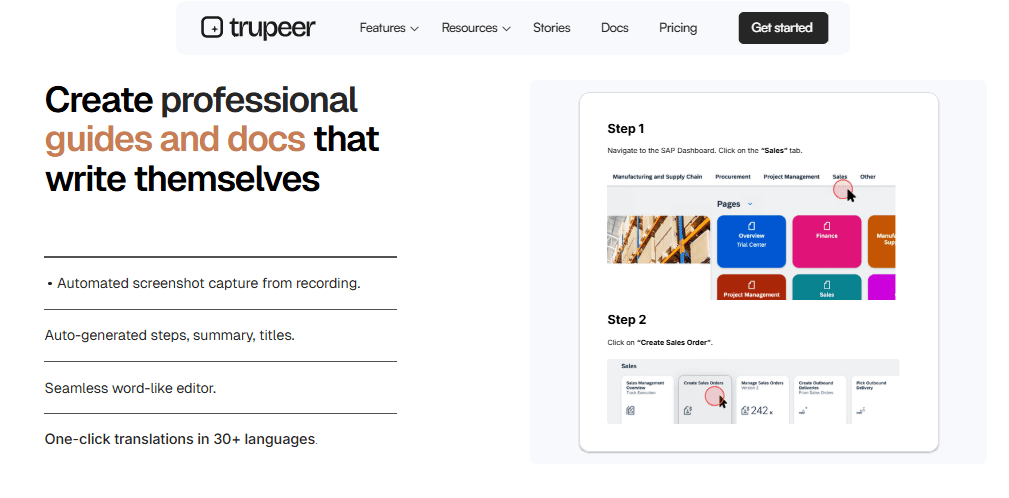
1. Saves time and cost. There is no need for manual editing or hiring a video team.
2. No special skills needed, as anyone can create polished videos.
3. With this free AI video generator, you get professional results. Its latest AI-based technology improves sound, syncs narration, and removes noise.
4. Works across multiple languages. You can instantly translate your videos.
5. Trupeer.ai is highly flexible and is ideal for creating:
Product demos
Onboarding videos
Training material
Tutorials, and more.
Trupeer Pricing
Free Plan - Price: $0 (valid for 10 days, with 1,000 AI credits a month and recordings up to 5 minutes)
Pro Plan - Price: $40/month billed yearly or $49/month monthly (2,000 AI credits a month, recordings up to 10 minutes, one creator seat)
Scale Plan - Price: $199/month billed yearly or $249/month monthly (10,000 AI credits a month, recordings up to 15 minutes, three seats, AI translation and brand kit)
Enterprise Plan - Price: Custom (recordings up to 3 hours, 100+ languages in bulk, custom voice and avatar clones, SSO)
Trupeer AI Reviews
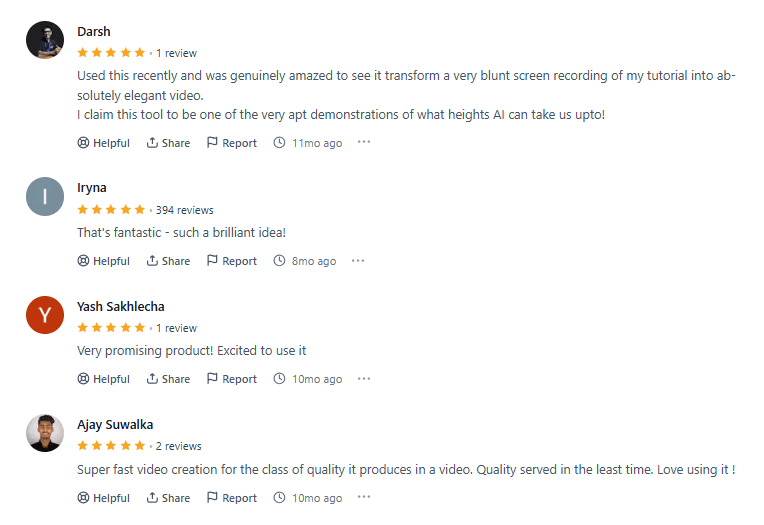
Trupeer.ai is a leading screen recording tool rated 4.8 on G2. Being nominated for the Golden Kitty Awards and rated product of the day twice, this Synthesia alternative is trusted by 10,000+ organisations worldwide. Let’s see what some real users are saying -
Don't have time to polish your rough screen recordings? Benefit from Trupeer’s advanced AI capabilities. Generate studio-grade videos in minutes.
Where it isn’t the answer: If you need a presenter delivering a scripted message with no product on screen, an avatar-first tool like Synthesia or HeyGen fits better. AI credits are metered on every plan (100 credits per minute of AI video, 50 more per minute with an avatar), and recordings are capped at 5 to 15 minutes below Enterprise.
Bottom line: The pick when the screen is the content and you also want a written guide. Try it free on one real recording.
2. Synthesia vs HeyGen: Best for Realistic AI Avatars and Video Translation
HeyGen is an AI-powered video generation platform. Through this Synthesia alternative, you can create high-quality and professional videos via customizable avatars, advanced text-to-speech, and a suite of automation tools.

HeyGen makes video production easy by eliminating the need for expensive equipment, technical expertise, or lengthy editing. This free AI video generator has an intuitive interface and powerful features. Using this tool, you can produce engaging videos in minutes!
Key Features of HeyGen
1. Choose from over 100 pre-designed avatars or create your own.
2. You get options to adjust clothing, facial expressions, gestures, and branding elements.
3. Generate lifelike voiceovers in 40+ languages and accents, or clone your own voice for a personalized touch.
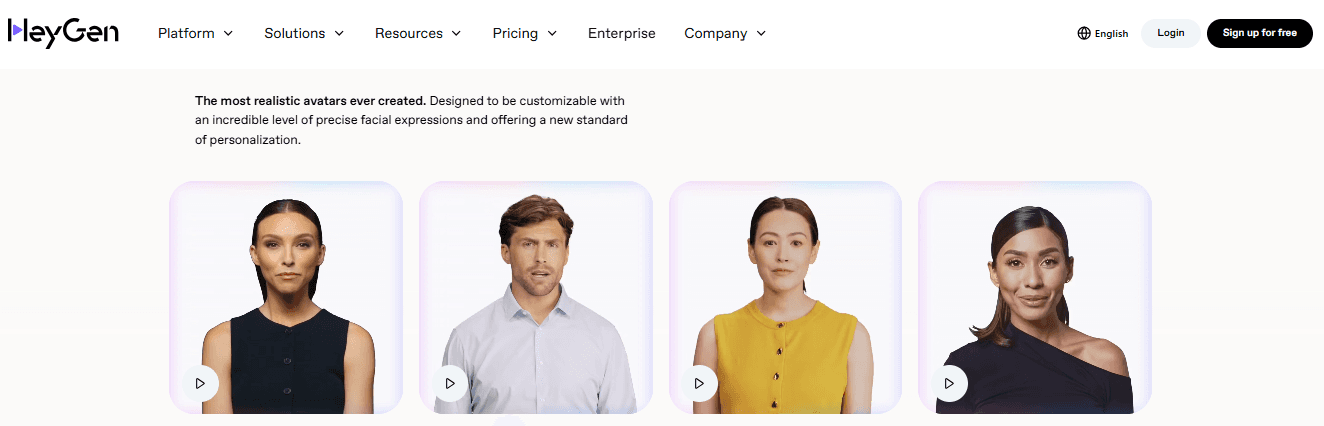
4. Produce videos where avatars speak your script with accurate lip-syncing in multiple languages.
5. Turn written scripts into polished videos with avatars and automated voiceovers.
6. Create multi-scene videos, customize each segment, and add transitions for storytelling.
7. Access a library of ready-to-use templates for marketing, education, social media, and more.
8. Enhance videos with music and sound effects from a built-in library.
9. Connect HeyGen with hundreds of other platforms to automate video creation and distribution.
10. Share videos directly to social media, CRM systems, or embed them on websites.
11. Generate and translate subtitles automatically. Export videos in 1080p with support for various formats. Create individualized greetings, onboarding, or customer communication videos. Enjoy SOC 2 Type 2 compliance for strong data protection.
Advantages of HeyGen
1. Automates video production. Your creation time gets reduced from hours to minutes!
2. HeyGen is cost-effective as it eliminates the need for filming equipment, studios, and professional editors.
3. Intuitive drag-and-drop interface suitable for beginners and professionals alike.
4. Lets you develop studio-grade videos with realistic avatars and voices.
5. Supports 40+ languages. You can create content for your diverse audiences.
6. This Synthesia alternative has versatile use cases. It is ideal for: Marketing, Education, Onboarding, Product demos, Personalized greetings and more
Disadvantages of HeyGen
1. There is limited customization even for advanced users.
2. Templates and avatars, while convenient, may feel restrictive for those seeking highly unique or complex video designs.
3. Most users feel pricing is high for advanced or enterprise-level features.
4. Requires a stable internet connection for video rendering and editing. It is a limitation in areas with poor connectivity.
5. Avatar gestures and animations can sometimes appear less natural compared to real human presenters.
6. Some users have reported dissatisfaction with customer support.
HeyGen Pricing
Free – $0/month
Creator – $29/month
Team – $39/seat/month (minimum 2 seats)
Enterprise – Custom pricing (Contact sales)
HeyGen Reviews

HeyGen is a powerful free AI video generator rated 4.8 on G2 and 4.0 on TrustPilot. Besides producing professional-quality videos, several users are cautious of its high pricing, lower creative control, and less advanced collaboration features. Let’s find out what some real users have to say -
Bottom line: The strongest like-for-like avatar alternative to Synthesia. Compare in detail: HeyGen alternatives.
3. Synthesia vs VEED.io: Best Browser-Based Video Editor with AI Tools

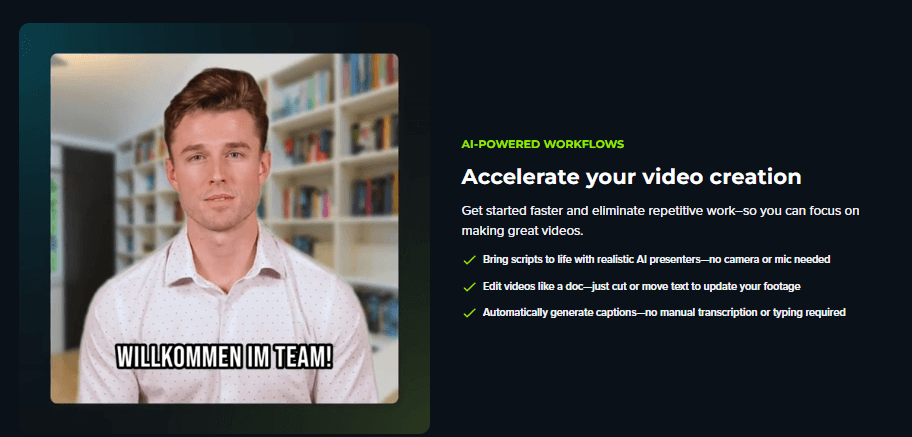
Veed.io is an online (cloud-based) video editing platform. This Synthesia alternative uses AI technologies to create professional-looking videos. It works directly in your web browser, so you don’t have to install any software. The platform specifically focuses on three major elements:
Speed: Lets you make videos quickly.
Ease of use: It has a simple interface and is ideal for people even without technical skills.
Automation: This free AI video generator uses AI tools to handle tasks like editing, adding subtitles, voice dubbing, and publishing.
Key Features of Veed.io
1. Edit videos in-browser with drag-and-drop tools for:Trimming, Cutting, Splitting, Resizing, Rotating clips
2. Add text overlays, logos, music, and transitions with ease.
3. Generate talking-head videos using customizable AI avatars.
4. Input your script, select an avatar, and Veed creates a synchronized, lip-synced presentation.
5. Turn text prompts into complete videos. Later, you can even edit scripts and visuals for full creative control.
6. Capture your screen, webcam, or both simultaneously.
7. This Synthesia alternative offers a feature called “Magic Cut”. It automatically removes silences and creates highlight clips. As a result, you save time on manual editing.
8. Generate accurate subtitles using AI speech recognition.
9. Customize font, size, color, and background, and export subtitles in multiple formats (SRT, VTT, TXT) or burn them into the video.
10. Translate and overlay spoken audio in different languages.

11. Convert written content into spoken audio with various voices and accents, or clone your own voice for personalized narration.
12. Add real-time effects like VHS, glitch, snow, and filmic filters to enhance visual appeal.
13. This free AI video generator lets you do “eye contact correction”. You can maintain natural eye contact in video presentations.
14. Edit and share projects with team members in real time. You can offer role-based access and commenting abilities.
15. Access over 2 million royalty-free video and audio assets.
Use customizable templates for intros, social media, marketing, and more.
16. Host videos on Veed, share via links, or export in various resolutions (including 1080p and 4K on higher tiers).
Advantages of Veed
1. Veed.io is highly beginner-friendly. You get an intuitive drag-and-drop interface with a minimal learning curve. This tool is suitable for users without editing experience.
2. You achieve significant time savings via automation. AI tools like auto-subtitles, Magic Cut, and text-to-video significantly reduce manual editing time.
3. This Synthesia alternative has versatile use cases. It supports content creation for: Social media, Marketing, Education, Training, Product demos, and more
4. No software installation required. As a user, you can access projects from any browser. This makes VEED ideal for remote teams.
Through automated translation and dubbing features, you can localize content for international audiences.
With this one of the best AI video generators, you get to use built-in libraries and templates. This speeds up content creation and enhances production value.
Disadvantages of VEED
1. Several users have reported glitches, lag, and slow uploads. This particularly happens with large or high-resolution files.
2. Some AI tools (like avatars and dubbing) underperform or lack polish compared to competitors, like Trupeer.ai. This leads to inconsistent results.
3. As a browser-based platform, a stable internet connection is mandatory. Slow or unreliable connections can disrupt workflow.
4. Lacks some advanced features found in professional-grade software. You may find it restrictive for complex editing needs.
5. There have been reports of slow or unresponsive support, particularly regarding billing and technical issues.
VEED Pricing
Free – with watermark and a 10-minute export limit
Lite – $12 per user/month (billed yearly)
Pro – $29 per user/month
Enterprise – Custom pricing (Contact sales)
VEED Reviews
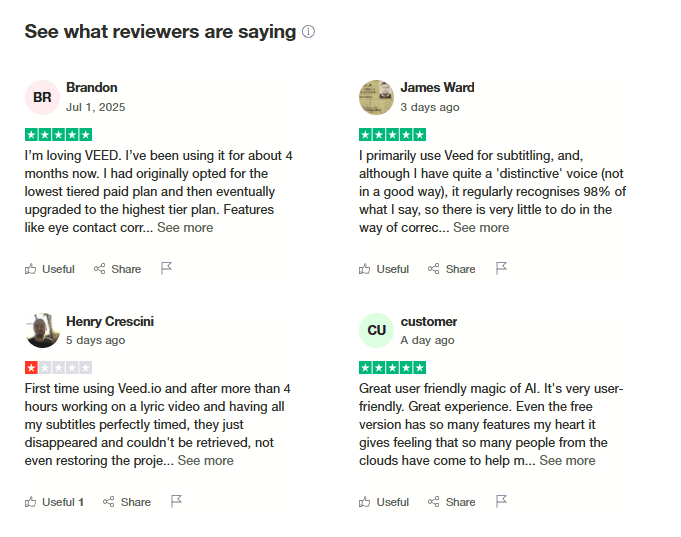
Veed.io is rated 3.9 on Trustpilot and has a strong 4.6 rating on G2. Based on reports from several users, those who require advanced editing features or enterprise-grade reliability usually encounter some limitations. Let’s see what some real people are saying about this Synthesia alternative -

Bottom line: Good for browser editing with AI extras, not a replacement for enterprise avatar training. Compare in detail: VEED alternatives.
4. Synthesia vs Camtasia: Best for Screen Recording and Manual Editing

Camtasia is a desktop software developed by TechSmith for recording your screen and editing videos. With this Synthesia alternative, you can record what happens on your screen, add webcam and audio, and then edit everything in one place. It is mostly used by teachers, trainers, marketers, and content creators to make tutorials, product demos, and online courses.
Key Features of Camtasia
1. Capture your full screen, a single window, or a custom area.
2. Supports high-quality recording up to 4K at 60 frames per second.
3. Produces sharp, clear videos suitable for professional use.
4. Record your webcam, microphone, and system audio at the same time.
5. Use multiple tracks for video, audio, images, and effects. You can arrange and edit them using a simple drag-and-drop timeline.
6. Add shapes, arrows, highlights, and text to point out important parts in your video.
7. Choose from 150+ transitions and motion effects to add smooth changes between scenes.
8. Use pre-built templates and design themes to keep your videos consistent.
9. Add quizzes, clickable links, and chapters to engage viewers and track interaction.
10. This free AI video generator removes filler words and does automatic voice improvements.
11. Access built-in music, sound effects, stock videos, and images.
12. Export videos directly to YouTube, Vimeo, or learning platforms.
Advantages of Camtasia
1. A simple layout with drag-and-drop controls makes it beginner-friendly.
2. It combines recording, editing, and content management in one software.
3. Templates and quick layouts allow users to create videos faster.
4. This Synthesia alternative offers many file formats and direct publishing to popular platforms.
5. Allows quizzes and clickable elements. It is highly useful for online learning.
6. Provides tutorials, customer service, and learning resources to help users.
Disadvantages of Camtasia
1. Does not include advanced editing features like multicam editing or keyframe motion tracking.
2. It can slow down or crash when working with large video files, particularly on computers with less than 16GB of RAM.
3. Offers fewer controls for customizing effects and shortcuts compared to high-end editors.
4. Only works as a desktop app for Windows and Mac. There is no online or browser-based version.
5. Costs more than some Synthesia io alternatives. Users may also need to pay extra for updates or advanced features.
6. Includes AI features, but they are not as advanced as those in AI-first video editing tools.
7. Some features, like avatars or translation, are only available in more expensive plans.
Camtasia Pricing
Camtasia Starter - $39 / year
Camtasia Essentials - $179.88 / year
Camtasia Create - $249 / year
Camtasia Pro - $599 / year (Business is $198 per user a year)
Camtasia Reviews
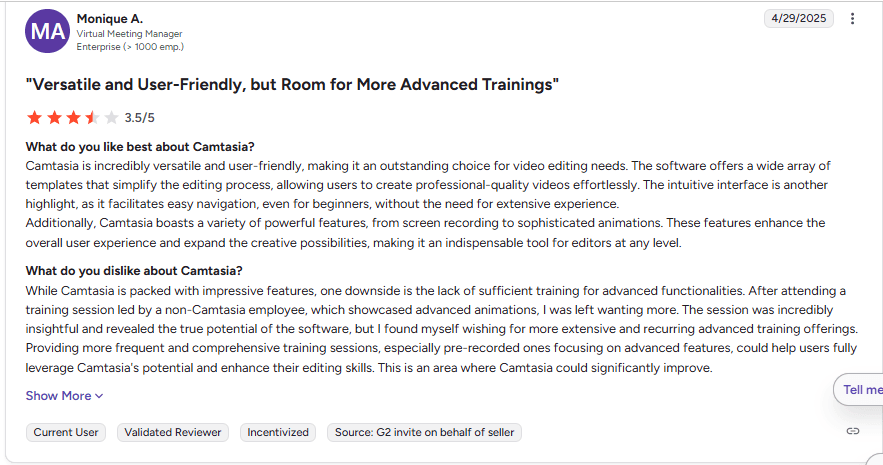
Camtasia is rated 4.6 on G2. The organisation has been conferred the titles of “highest user adoption” and “best results enterprise” for Spring 2025. However, upon analyzing multiple real reviews, we found issues like limited features, steep learning curve, and slow performance. Have a look at some user reviews yourself -

Bottom line: Right when you need full manual control of screen tutorials. Compare in detail: Camtasia alternatives.
5. Synthesia vs Colossyan: Best for Interactive Training with SCORM

Colossyan is an AI-based video creation platform. Through this Synthesia AI alternative, you can create professional videos using digital avatars instead of real people or camera equipment. You enter your script or upload documents like PDFs or PowerPoint slides, and the platform automatically turns them into videos. These videos can be used for:
Employee training
Onboarding
Internal communication
Multilingual learning
Key Features of Colossyan
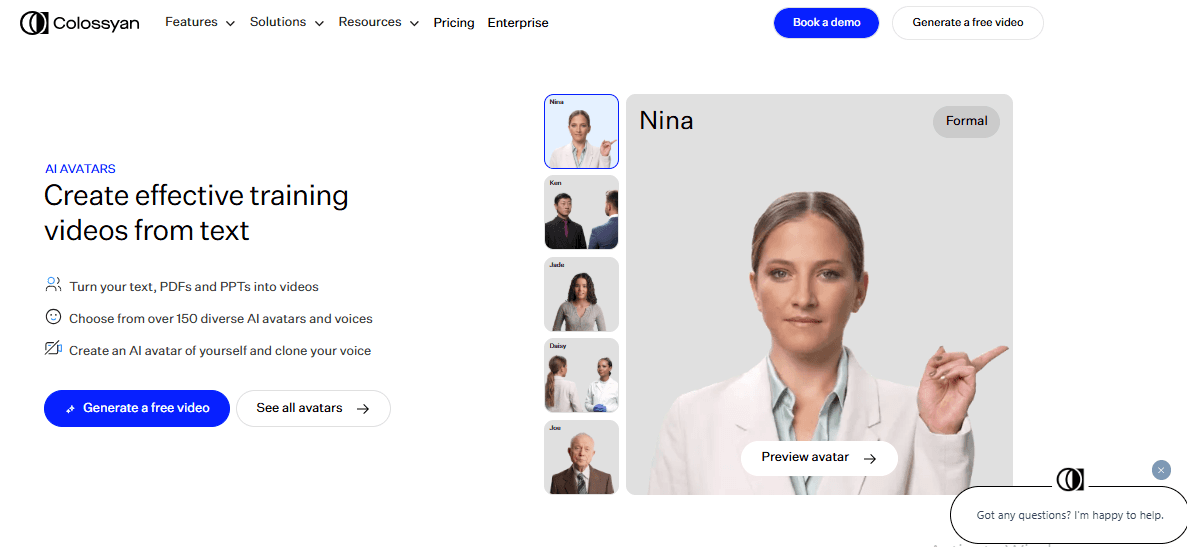
1. Pick from over 150 avatars with different appearances, voices, and accents. You can also create your own avatar and voice.
2. Make videos in over 70 languages to reach global audiences.
3. Convert text, documents, or presentations into narrated videos.
4. Adjust the tone, speed, and gestures of the avatar while speaking.
5. Add subtitles, background music, branding, transitions, and cut scenes.
6. Add quizzes, clickable areas, and conversations between avatars.
7. Use pre-made templates and brand kits for consistency.
8. Work with your team in shared spaces and store content in the cloud.
9. Track who watched your video and how they engaged.
10. Connect Colossyan to your existing tools or platforms.
Advantages of Colossyan
1. The interface is easy to understand and doesn’t require video production experience.
2. Saves time compared to traditional filming and editing methods.
3. Language support makes it easy to create content for different regions.
4. Many avatars, voice styles, and templates are available for different communication needs.
5. You don’t need video equipment or real actors to make content.
6. Allows multiple users to collaborate and manage content together.
7. Several users have reported responsive and helpful customer service.
Disadvantages of Colossyan
1. Missing some advanced features like complex animations or fine-tuned video effects.
2. Sometimes AI avatars lack emotional expressions and do not feel fully natural.
3. Fewer scene and character choices may limit your creative options.
4. Some translations may have minor errors or lack natural tone.
5. Best suited for internal training. Users say this Synthesia alternative is not perfect for public-facing marketing videos.
6. You cannot record yourself directly; all videos are AI-generated.
7. New users may take time to learn how to use the platform.
8. Pricing increases as you make more videos or scale production.
Colossyan Pricing
Free - 20 minutes of video a month
Professional - $59 per month, or $30 per member per month billed yearly, with five SCORM exports a month
Enterprise - Custom pricing, with unlimited SCORM exports
Colossyan Reviews
Using Colossyan, you can create training and instructional videos incorporating AI avatars. The organisation is rated 3.5 on Trustpilot and an impressive 4.7 on G2 (based on 494 reviews). However, several real users state that it is not suited for complex video editing or marketing-focused projects. The product has limited avatars that even lack emotions. Read out some real reviews yourself -

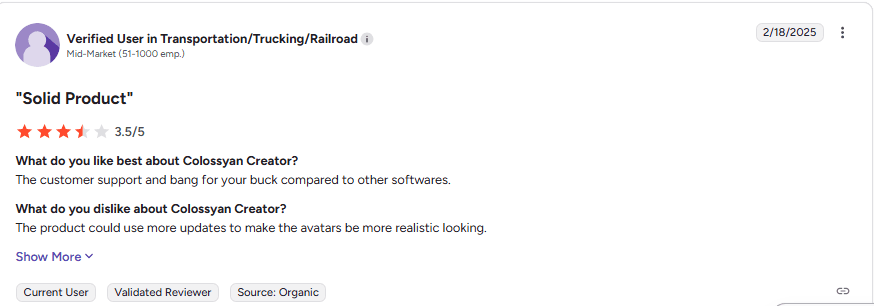
Bottom line: The closest Synthesia alternative for training teams that need quizzes and SCORM at a mid-market price.
6. Synthesia vs D-ID: Best for Photo-to-Avatar Talking Videos
D-ID specialises in animating a still photo into a speaking presenter using AI voices. It is often compared with Synthesia by people who want talking-head videos at a lower entry price, and by developers who want an avatar API.
Key Features of D-ID
Photo-to-video: turn a still image into a talking avatar
Stock avatars and AI voices in 100+ languages
API access for personalised video in apps
Creative Reality Studio editor
Advantages of D-ID
It has one of the lowest entry prices for avatar video and a strong API, which makes it popular with developers and for personalised outreach.
Disadvantages of D-ID
The cheapest plan adds a watermark and is for personal use only; commercial use starts on Pro. It has fewer templates and stock assets than Synthesia and is not built for screen-recorded product content.
D-ID Pricing
Trial – 14 days, limited credits
Lite – $5.90/month, or $4.70/month billed yearly (watermarked, personal use)
Pro – $29/month, or $16/month billed yearly (commercial use)
Advanced – $196/month, or $108/month billed yearly
Enterprise – custom pricing
Bottom line: A cheap way into avatar video. Check the watermark and commercial-use limits first.
7. Synthesia vs Vyond: Best for Animated Explainer Videos
Vyond is an animation platform for character-led explainer and training videos, with AI avatars, text-to-video and screen recording added in recent years.
Key Features of Vyond
Large library of animated characters, props and scenes
AI avatars and 650+ text-to-speech voices
Screen and webcam recording inside the editor
Translation on Professional and above
Advantages of Vyond
L&D and internal comms teams use it for scenario-based training and storytelling that a live-action avatar cannot deliver.
Disadvantages of Vyond
It is expensive for solo creators, has a learning curve, and its house animation style can make videos look similar across brands.
Vyond Pricing
Starter – $58/month billed yearly ($699/year), or $99 monthly
Professional – $100/member/month billed yearly ($1,199/year), or $199 monthly
Enterprise – $137/member/month, annual only
Agency – $167/member/month, annual only
Bottom line: Choose it for animated storytelling rather than realistic presenters.
Synthesia AI Alternatives: Detailed Comparison
All seven popular Synthesia io alternatives in this guide offer smart ways to turn text or screen recordings into videos. The table below compares five of them - Trupeer.ai, HeyGen, VEED.io, Camtasia, and Colossyan. If your goal is to create professional product videos, tutorials, or how-to guides automatically from your screen recording, Trupeer.ai stands out clearly.
For a better understanding, study the comparison table below:
Feature / Tool | Trupeer.ai | HeyGen | VEED.io | Camtasia | Colossyan |
How Videos Are Made | Converts screen recordings into video + guide | Text-to-video with avatars | In-browser editing and text-to-video | Manual screen recording and editing | Text/document to video with avatars |
Voiceover Options | 100+ AI voices + voice cloning | 40+ voices + cloning | Text-to-speech + voice cloning | Manual recording or AI enhancement | 70+ voices and languages |
Avatars | AI avatars + optional use | 100+ avatars + customization | Basic AI avatars (less advanced) | Not included | 150+ avatars + custom ones |
Multilingual Support | Translates audio and captions from a library of 100+ languages (Scale and Enterprise) | 40+ languages, auto voice translation | Translation for subtitles and dubbing | Limited, not AI-first | 70+ languages |
Auto Documentation | Creates step-by-step guides with screenshots | Not available | Not available | Not available | Not available |
Editing Skills Needed | None – AI handles it all | Moderate skills required | None | Required for full use | None |
Customization Options | Add logos, music, avatars, voiceovers, and backgrounds | Clothes, gestures, templates | Transition, subtitles, and some avatars | Templates, transitions | Scene-based changes, branding |
Script Automation | Automatically refines scripts and removes fillers | Manual script writing | Manual script writing | Manual script writing | Manual script or document import |
Free Plan Available | 10 AI video minutes + 5 guides | 3 videos/month | Lite plan with basic features | Trial only | No free plan |
Best Free Synthesia Alternatives
Looking for a Synthesia free alternative, or a free alternative to Synthesia you can test before paying? These tools have free plans or trials:
HeyGen: free plan for testing avatar videos.
Colossyan: free plan with 20 minutes of video a month.
VEED.io: free plan with a watermark.
D-ID: 14-day free trial.
Trupeer AI: 10-day free plan with 1,000 AI credits for screen-recording-based videos and guides.
Synthesia itself: a free Basic plan with roughly 10 minutes of video a month.
Free plans usually add watermarks or limit minutes and commercial use, so use them to test quality rather than to publish at scale.
Synthesia vs Camtasia, Colossyan, HeyGen and Loom: Quick Comparisons
Camtasia vs Synthesia: Synthesia generates presenter videos from a script; Camtasia records and edits your real screen on a timeline. Choose Synthesia for presenter-led messages and Camtasia for detailed screen tutorials. See our Camtasia alternatives.
Colossyan vs Synthesia: both are avatar platforms for training. Colossyan adds branching, quizzes and SCORM on its Professional plan; Synthesia has more avatars, languages and enterprise governance.
Synthesia vs HeyGen: HeyGen is often preferred for avatar realism and translation; Synthesia for enterprise controls and training libraries.
Synthesia vs D-ID: D-ID is cheaper to start and animates photos; Synthesia offers more templates, languages and enterprise features.
Loom vs Synthesia: Loom records your real screen and voice for quick messages; Synthesia generates a presenter from a script without recording. See our Loom alternatives.
Is Trupeer AI the Right Synthesia Alternative for You?
Trupeer AI is one of the few tools that turns your screen recording into both a video and a step-by-step guide. Manually? No! Everything is automated and done via artificial intelligence. As a result, you don’t need editing or writing skills.
Just record your screen, and the AI does the rest for you includes-
AI voiceovers in 100+ languages and accents
AI avatars, with custom avatar and voice clones on Enterprise
Translations (Scale and Enterprise)
Auto script refinement
Trupeer AI is a good fit if:
Your videos are about software, products or processes, so the screen is the content.
You want a polished, narrated video and a written guide from one recording.
You want an avatar or AI voice as an option, not the whole video.
Trupeer AI is not the right fit if:
You need a presenter delivering a scripted message with no screen content. Synthesia, HeyGen or Colossyan fits better.
You need branching scenarios or quizzes inside the video. Colossyan is built for that.
You need character animation. Vyond is the better pick.
Can you try before spending? Yes, the 10-day free plan includes 1,000 AI credits, roughly 10 minutes of AI video, so you can test it on a real recording before committing. Create your first video today!
Which Synthesia Alternative Should You Choose?
Trupeer AI for product and software videos without talking-head avatars, plus written guides.
HeyGen for the most realistic avatars and translation.
VEED.io for browser-based editing.
Camtasia for manual screen tutorials.
Colossyan for interactive training with SCORM.
D-ID for low-cost photo avatars and API use.
Vyond for animated explainers.
Stay on Synthesia if you need presenter-led training in many languages with enterprise governance, and its minute limits fit your volume.
Frequently Asked Questions About Synthesia Alternatives
1. I don’t have editing or scripting skills. Can I still create professional videos?
This is a common challenge for many people. Most traditional tools require you to manually: Write a script, Record clean audio, Edit it.
However, with Trupeer.ai, you just record your screen and speak naturally. Next, the AI will:
Clean up your narration, Generate a polished script, Add professional voice-overs, Produce a studio-quality video
With this Synthesia alternative, you do not need any writing or video editing skills. Everything is automated via artificial intelligence.
2. AI avatars and voices don’t sound natural. How can I make my videos feel more human?
Many AI video tools have robotic voices or stiff avatars that break the viewer's trust. While technology has improved, not every tool gets it right! To create a better experience, you should always choose platforms that offer voice cloning or customizable avatars.
Also, check if the tool lets you adjust voice tone, speed, and gestures. Such an adjustment allows you to better match your brand’s tone.
3. I spend hours creating how-to videos and documentation separately. Can I automate this?
Creating a video and then writing a matching guide takes double the effort. Particularly, this is frustrating when you have deadlines or need to give constant product updates.
Need solutions? With Trupeer.ai, you can solve this issue by generating both the video and a step-by-step written guide from a single screen recording. This way, you don’t have to repeat your work!
4. Can I create videos in multiple languages without hiring translators or voice actors?
Yes, if you're creating content for a global audience, look for tools that support built-in AI translation and multilingual voiceovers. The best Synthesia alternatives, like Trupeer.ai, can auto-generate captions and voiceovers from a library of 100+ languages.
5. My product keeps changing. Do I have to remake the video every time?
This is a common frustration! If your product UI changes frequently, updating videos manually becomes a nightmare. That’s because you have to re-record, re-edit, and rewrite guides every time.
With some smart Synthesia io alternatives like Trupeer AI, updating is much lighter. Record the updated flow, and Trupeer regenerates the narrated video and the written guide with your existing voice, brand kit and formatting, so you are not rebuilding a script and avatar scenes from scratch.
6. Is there a free Synthesia alternative?
Yes. HeyGen and Colossyan have free plans, VEED has a watermarked free plan, D-ID has a 14-day trial, and Trupeer AI has a 10-day free plan. Synthesia itself also offers a free Basic plan with about 10 minutes of video a month.
7. How much does Synthesia cost in 2026?
Synthesia Starter is $29 a month ($18 billed yearly), Creator is $89 a month ($64 billed yearly) and includes SCORM, and Enterprise is custom. A free Basic plan gives about 10 minutes of video a month.
8. What is a good Synthesia alternative that works in the browser without installing anything?
Trupeer AI, HeyGen, VEED.io, Colossyan, D-ID and Vyond all run in the browser. Camtasia is the only desktop software on this list.
9. Synthesia vs Camtasia: which is better for training videos?
Synthesia is better for presenter-led training created from a script. Camtasia is better for detailed screen tutorials you edit by hand. For screen-based training without manual editing, Trupeer AI automates the edit.
10. Colossyan vs Synthesia: which should you choose?
Choose Colossyan for interactive training with quizzes and SCORM at a mid-market price. Choose Synthesia for a larger avatar library, more languages and enterprise governance.
11. What is the best Synthesia alternative for enterprise?
For enterprise L&D, Colossyan and HeyGen are the closest avatar alternatives, and Trupeer AI Enterprise covers screen-based training with SSO, 100+ languages and custom voice and avatar clones. See our guide to Synthesia alternatives for enterprise L&D and presales teams.
12. What are programs and software like Synthesia?
Programs and apps like Synthesia, and other alternatives to Synthesia, include HeyGen, Colossyan and D-ID for AI avatars, Vyond for animation, VEED for AI-assisted editing, and Trupeer AI for turning screen recordings into narrated videos.
13. Who are Synthesia’s main competitors?
The main Synthesia AI competitors are HeyGen, Colossyan, D-ID and Vyond in avatar and animated video, with Trupeer AI, Camtasia and VEED for screen-based and edited video.
Související blogy



