Trupeer Blog
Opsummer

Imagine you're managing customer support for a large enterprise, and the volume of support tickets is overwhelming your team. Your customers are constantly encountering similar issues, and your support team is drowning in repetitive queries. The stakes are high: slow response times can lead to unhappy customers and lost revenue. This is where a tier-0 self-help video layer becomes crucial. A well-executed video-based tier-0 support system can deflect up to 50% of common customer inquiries before they reach your human agents, reducing response times and increasing customer satisfaction. Companies that use AI video editing see a marked improvement in efficiency and productivity, as the editing process is simplified with automated features.
Why does building a tier-0 self-help video layer matter?
In enterprises, customer support isn't just about resolving issues. It's about maintaining relationships, ensuring satisfaction, and driving retention. As businesses scale, the volume of customer interactions increases dramatically. Without an efficient tier-0 support system, support teams can become overwhelmed, leading to delayed responses and frustrated customers. This is particularly critical for enterprises with a global customer base where time zones complicate live support availability.
Tier-0 support isn't just a nice-to-have; it's a necessity for scaling operations without proportionally increasing support costs. Creating a video-based self-help layer can significantly reduce the number of incoming tickets. This allows your support team to focus on more complex issues that require human intervention. For instance, a well-crafted video tutorial can address common setup questions, enabling customers to resolve issues independently. This deflection not only saves time but also enables customers, leading to a more positive overall experience.
By integrating tier-0 video support, enterprises can also maintain a consistent quality of service. Video content ensures that instructions are clear and consistent, reducing the variability that can occur with written responses. This is crucial in maintaining brand reputation and customer trust. With the right tools, such as Trupeer's training videos use case, enterprises can ensure their tier-0 support layer is both effective and efficient, meeting the modern demands of customer service.
What are the benefits of a tier-0 self-help video layer?
Implementing a tier-0 self-help video layer has several tangible benefits that can transform customer support operations.
Cost Reduction. A tier-0 video layer can significantly reduce the number of support tickets. This leads to lower operational costs by minimizing the need for an expanded support team.
Increased Efficiency. With common issues resolved through video, support teams can focus on more complex queries. This results in faster resolution times and improved service levels.
Improved Customer Satisfaction. Customers appreciate quick solutions. Video tutorials can provide immediate answers, enhancing the customer experience and boosting satisfaction metrics.
Consistent Messaging. Videos ensure that all customers receive the same high-quality information. This consistency is critical for maintaining brand integrity and customer trust.
Scalability. A video-based tier-0 layer can handle increasing customer interactions without additional resources, making it ideal for growing enterprises. Using an AI video platform allows for easy scaling.
Engagement and Retention. Engaging content can keep customers returning for more. An AI-powered video tool ensures that content is engaging, which can lead to higher retention rates.
Which Trupeer features help you build a tier-0 self-help video layer?
Trupeer offers a range of features that can significantly enhance your tier-0 self-help video layer, making it more effective and efficient.
AI screen recording with auto-zoom and click detection
Trupeer's AI screen recording capability automatically detects clicks and zooms into areas of interest, ensuring that your instructional videos clearly highlight the steps your viewers need to follow. This feature is particularly useful for creating tutorials and how-to guides where visual clarity is crucial. By automating the zooming and click detection, it reduces the need for manual editing, saving time and ensuring consistency across all your video content. This feature supports enterprise-grade video content creation, allowing even non-technical users to produce professional-quality videos.
Silent screen recording with automatic AI narration
This feature allows you to capture screen activity without worrying about background noise or interruptions. Trupeer's AI generates natural-sounding narration to accompany your recordings, making it easier for viewers to follow along. With over 65+ natural voice options and adjustable pace and tone, you can tailor the narration to suit your brand's voice. This capability is perfect for creating accessible content that can be understood by diverse audiences, enhancing the overall effectiveness of your tier-0 support. By integrating this with the AI documentation platform, you can ensure all videos are accompanied by accurate and up-to-date documentation.
AI avatars / talking-head video
Adding a personal touch to your self-help videos can increase engagement. Trupeer's AI avatars and talking-head video feature allow you to include avatars in your videos for a more personalized feel. You can choose from a stock library or create custom avatars using HeyGen integration. This feature helps humanize the support experience, making customers feel more connected to your brand. It's particularly beneficial for scenarios where face-to-face interaction isn't possible but is highly desirable. Combining this with an AI-searchable knowledge base, you can create a comprehensive support ecosystem.
Auto chapters and segment detection
Trupeer's auto chapters and segment detection feature automatically breaks down your video content into easily navigable sections. This makes it easy for viewers to jump to the parts of the video that are most relevant to them, enhancing the overall user experience. It's especially useful for longer videos where viewers might only need specific information. This level of accessibility can drastically improve engagement rates, ensuring that your tier-0 support videos are not only informative but also user-friendly. For more insights, ai/tools/enterprise-training-video-software">enterprise training video software to simplify your video creation process.
AI translation into 40+ languages with lip-sync
For enterprises with a global audience, language can be a barrier. Trupeer's AI translation feature allows your video content to be translated into over 40 languages while maintaining lip-sync accuracy. This ensures that your tier-0 support videos are accessible to a wider audience, breaking down language barriers and providing a smooth experience for non-English speaking customers. This feature is crucial for maintaining a consistent level of support across different regions, ensuring that all customers receive the same high-quality information. The ability to localize content effectively can significantly enhance customer satisfaction and engagement on a global scale.
How do you build a tier-0 self-help video layer step by step with Trupeer?
Step 1: Capture Your Screen
Begin by using Trupeer's AI screen recording with auto-zoom and click detection to capture your screen activity. Open the Trupeer desktop app or browser-based recorder and select the screen or application you want to record. As you work through your process, Trupeer will automatically zoom into areas of interest and highlight clicks, making it easy for viewers to follow along. This feature saves time by eliminating the need for manual adjustments in the post-production phase. Once the recording is complete, review the auto-generated highlights to ensure all critical steps are captured effectively.

Step 2: Add Narration
Next, use Trupeer's silent screen recording with automatic AI narration to add voiceovers to your video. Choose from over 65+ natural voices within Trupeer's library, and adjust the pace and tone to match your brand's voice. This feature is particularly useful for ensuring clarity and engagement, especially for viewers who prefer auditory learning. Simply select the "AI Narration" option in the post-capture menu, and Trupeer will create a smooth voiceover that aligns with the on-screen actions. This step usually takes just a few minutes, allowing for rapid content creation without sacrificing quality.

Step 3: Customize with AI Avatars
Personalize your videos by adding AI avatars or talking-head video content. Access Trupeer's avatar library or use the HeyGen integration to create a custom avatar that represents your brand. To add an avatar, click on the "Insert Avatar" option in the editing interface, then select the desired avatar and position it within the video frame. This adds a human touch to your instructional videos, increasing viewer engagement and retention. It's an excellent way to maintain a connection with your audience, even in a digital format.

Step 4: Segment Your Video
Use Trupeer's auto chapters and segment detection to organize your video into logical sections. After uploading your video to the Trupeer platform, activate the "Auto Chapters" feature. The software will automatically divide your content into chapters, each with a clickable timestamp, making navigation easier for the viewer. This is particularly advantageous for lengthy videos covering complex topics, as it allows viewers to jump directly to the sections that interest them most. This process can be completed in under five minutes, simplifying the video organization phase.
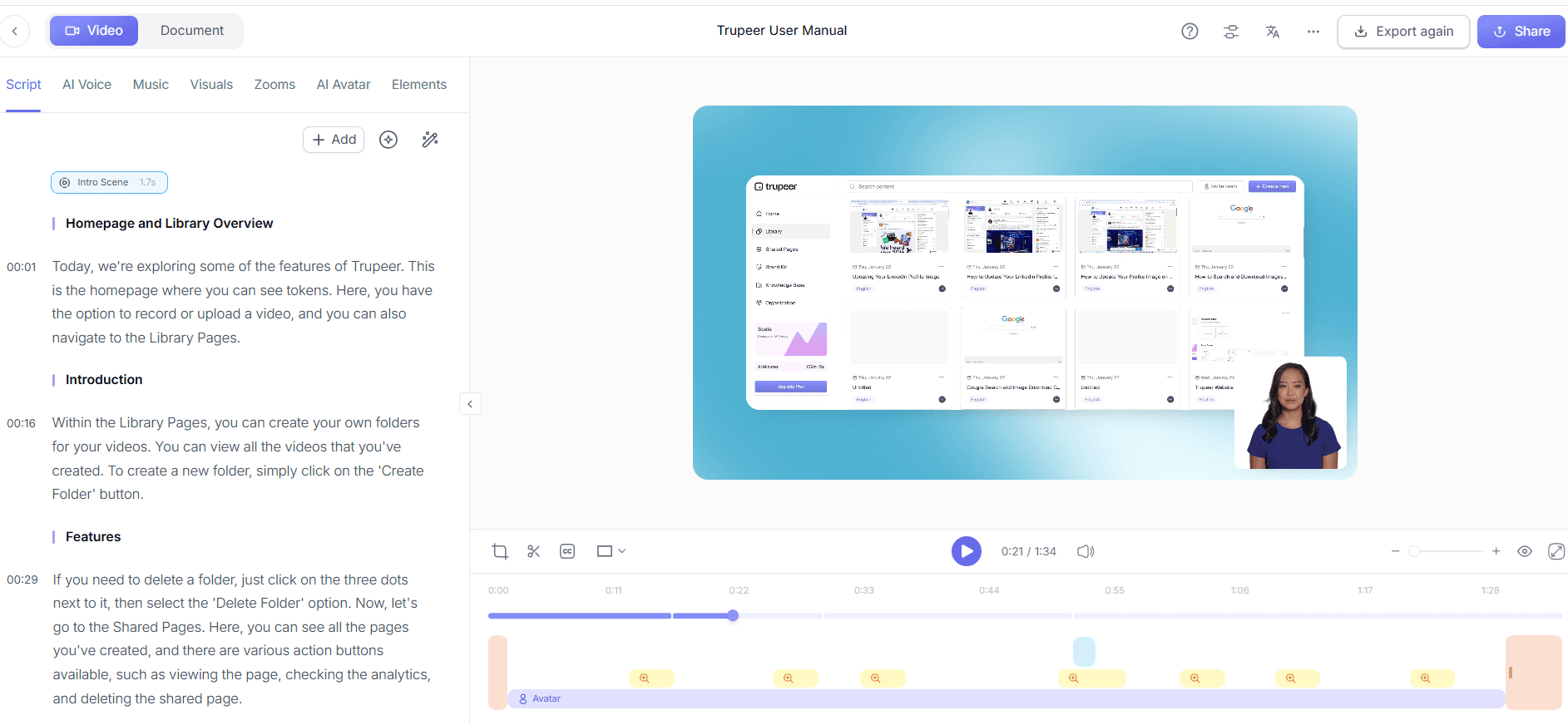
Step 5: Translate and Localize
With a global audience in mind, employ Trupeer's AI translation into 40+ languages with lip-sync. Select the "Translate" option from the video settings, choose your desired languages, and let Trupeer handle the rest. The translation process maintains lip-sync accuracy, ensuring that your message is conveyed clearly across diverse linguistic audiences. This feature is especially critical for enterprises looking to provide inclusive support to non-English speaking customers, as it enables efficient and effective communication on a global scale. Teams weighing tools often start with a Loom alternatives comparison before standardizing on a workflow.

Step 6: Publish and Distribute
Finally, publish your video using Trupeer's distribution features, including AI-searchable knowledge base integration. Host the video on a custom domain with single sign-on (SSO) for secure access. Embed video widgets into your application or website for in-app guidance. Trupeer's platform allows you to set up shared pages and client-facing portals, ensuring your tier-0 support content is easily accessible. The entire distribution process can be completed within an hour, allowing you to quickly deploy support resources to your customer base.

What tips help you build a tier-0 self-help video layer?
Building an effective tier-0 self-help video layer requires strategic planning and execution. Follow these tips to optimize your video content and enhance user experience.
Plan Your Content. Outline the topics your videos will cover, focusing on common customer queries. A structured approach ensures comprehensive coverage of key issues.
Keep Videos Concise. Aim for a duration of 2-5 minutes per video, focusing on one topic at a time. Shorter videos are easier to digest and retain viewer attention.
Use Clear Visuals. Ensure that your screen captures are high-quality and clearly highlight the necessary actions. ai/tools/video-trimmer">video trimmer to cut unnecessary parts.
Maintain Consistency. Use consistent branding and style across all videos. This builds familiarity and trust with your audience over time.
Engage with Avatars. Introduce AI avatars to add a personal touch, making the experience more relatable and engaging for viewers.
Localize for Diversity. Ensure your videos are accessible to a global audience by using AI translation services. This expands your reach and improves customer satisfaction.
Review and Update. Regularly review your video content for accuracy and relevance. Update videos as needed to reflect any changes in your product or service offerings.
When SOPs come into the same conversation, a Scribe alternatives comparison helps clarify the scope.
Frequently asked questions
How does a tier-0 self-help video layer reduce support costs?
A tier-0 self-help video layer reduces support costs by deflecting common inquiries away from human agents. By providing customers with video tutorials that address frequently asked questions, you lower the volume of incoming tickets, allowing your support team to focus on more complex issues that require human intervention. This not only decreases the need for a large support staff but also speeds up response times, improving overall efficiency. The cost savings from reduced ticket volume can be significant, especially for enterprises handling thousands of interactions daily.
What tools are essential for creating effective self-help videos?
To create effective self-help videos, you'll need tools that offer screen recording, video editing, and distribution capabilities. Trupeer provides a comprehensive suite with AI screen recording, automatic narration, and avatar integration, making it a solid choice for enterprises. also, having access to a video translation platform ensures your content is accessible to a global audience. These tools simplify the video creation process and enhance the quality and reach of your support content, making them essential for any tier-0 video strategy.
Why is AI narration beneficial in video tutorials?
AI narration enhances video tutorials by providing clear and consistent audio guidance. This feature eliminates the need for live voiceovers, which can be time-consuming and require professional equipment. With Trupeer's AI narration, you can choose from over 65+ natural voices, adjusting the pace and tone to suit your brand's needs. This ensures that all viewers receive the same high-quality auditory experience, making complex information more digestible. AI narration also speeds up the production process, allowing for quicker turnaround times on new content.
Can self-help videos improve customer satisfaction?
Yes, self-help videos can significantly improve customer satisfaction by providing quick and easy access to solutions. When customers can find answers through engaging video content, they experience fewer delays and less frustration, leading to a more positive interaction with your brand. Well-crafted videos offer step-by-step guidance that is often more effective than written instructions, reducing the chance of misinterpretation. This proactive support approach not only meets customer expectations but often exceeds them, building loyalty and trust.
Does Trupeer support multilingual video content?
Yes, Trupeer supports multilingual video content through its AI translation into 40+ languages with lip-sync accuracy. This feature ensures that your videos are accessible to a global audience, allowing you to provide consistent support across different regions. By breaking down language barriers, you can enhance the inclusivity and effectiveness of your tier-0 support layer. This capability is particularly valuable for enterprises with a diverse customer base, as it enables them to maintain high standards of service regardless of linguistic differences.
Related Blogs


